Trust & transparency
Evidence & disclosures
Evidence basis: Manufacturer-supplied evidence. Material claims or demonstrations came from the company responsible for the product and are not independent results.
Based on Apple’s newsroom, product, store, and support pages; I have not tested the second-generation AirTag in real travel conditions.
Sources checked: Aug 20, 2026
Linked references: 6 explicit sources in the article.
If you are the person who checks the kitchen counter, the couch cushions, yesterday’s pants, and then the kitchen counter again looking for your keys, an AirTag is one of those wonderfully boring pieces of technology that can earn its keep.
Apple’s second-generation AirTag does not reinvent that idea. It is still a small tracker for your belongings. It still works through the Find My app. It is still $29 for one or $99 for a four-pack in the United States.
What Apple changed is the part that matters when the missing thing is nearby but stubbornly invisible: the new AirTag can guide you from farther away, its speaker is louder, and compatible Apple Watches can now provide Precision Finding.
That makes it a very easy recommendation for a first-time buyer who lives in Apple’s ecosystem. It does not automatically make every original AirTag obsolete.
I have not put the second-generation model through my own hands-on range test yet, so the improvement figures below are Apple’s measurements. This is a practical buying guide based on Apple’s current product and support documents, not me pretending I crawled around an airport baggage room with a tape measure.
TLDR
- The new AirTag remains $29 for one or $99 for four in the United States.
- Apple says Precision Finding works from up to 50 percent farther away than on the original AirTag.
- The speaker is 50 percent louder and can be heard from up to twice as far away, according to Apple.
- Precision Finding now works on certain newer Apple Watches, not only a compatible iPhone.
- Share Item Location can give a participating airline a temporary link to help recover delayed luggage, but that feature is not a reason by itself to replace an original AirTag.
- If your original AirTag already finds your keys and bags reliably, keeping it is the sensible choice.
- AirTag is for belongings. Apple says it is not designed to track people or pets, and it is not a live GPS safety device.
What Actually Changed
The improvements are not flashy, but they address the most common AirTag frustration: knowing an item is somewhere nearby without being able to put your hand on it.
Precision Finding Reaches Farther
Apple says its second-generation Ultra Wideband chip lets Precision Finding guide you to an item from up to 50 percent farther away than the previous generation.
Precision Finding is the feature that gives you distance and direction when a compatible device is close enough to connect to the AirTag. Instead of staring at a map pin and wondering whether your keys are in the bedroom or under the driver’s seat, you get a much more specific warm-cold-warmer experience.
Apple also says an upgraded Bluetooth chip expands the range at which an item can be located, although it does not publish one simple guaranteed distance for every home, parking lot, or airport. Walls, interference, the device you use, and local conditions still matter.
The Speaker Is Easier to Hear
The new speaker is 50 percent louder, and Apple says the AirTag can be heard from up to twice as far away as the original.
That may be the most useful upgrade for people who lose keys in very ordinary places. A better sound can help when an AirTag is buried in a bag, trapped between couch cushions, hiding under a car seat, or doing whatever small electronics do when they want to embarrass us.
Precision Finding Comes to Apple Watch
For the first time, a compatible Apple Watch can use Precision Finding with the second-generation AirTag.
Apple’s current support page lists Apple Watch Series 9 or later, excluding Apple Watch SE models, and Apple Watch Ultra 2 or later with watchOS 26.2.1 or later. That can be genuinely convenient when your phone is charging in another room or already packed inside the bag you are trying to find.
Ultra Wideband and Precision Finding are not available in every country or region, so check Apple’s regional availability information if this feature is the reason you are buying.
What Did Not Change
The new model keeps the same basic formula:
- One AirTag costs $29 in the United States, while a four-pack costs $99.
- The physical shape is the same, and Apple says existing AirTag accessories remain compatible.
- The battery is a user-replaceable CR2032 coin cell that Apple says lasts more than a year under normal use.
- AirTag remains water- and dust-resistant with an IP67 rating under Apple’s stated test conditions.
- It still depends on Apple’s Find My network rather than having its own cellular GPS connection.
That last point matters. An AirTag sends out a Bluetooth signal. Nearby Apple devices in the Find My network can detect it and privately relay an approximate location to the owner. A map update may be extremely helpful, but it is not the same as watching a dedicated cellular tracker move second by second.
Should You Upgrade From the Original AirTag?
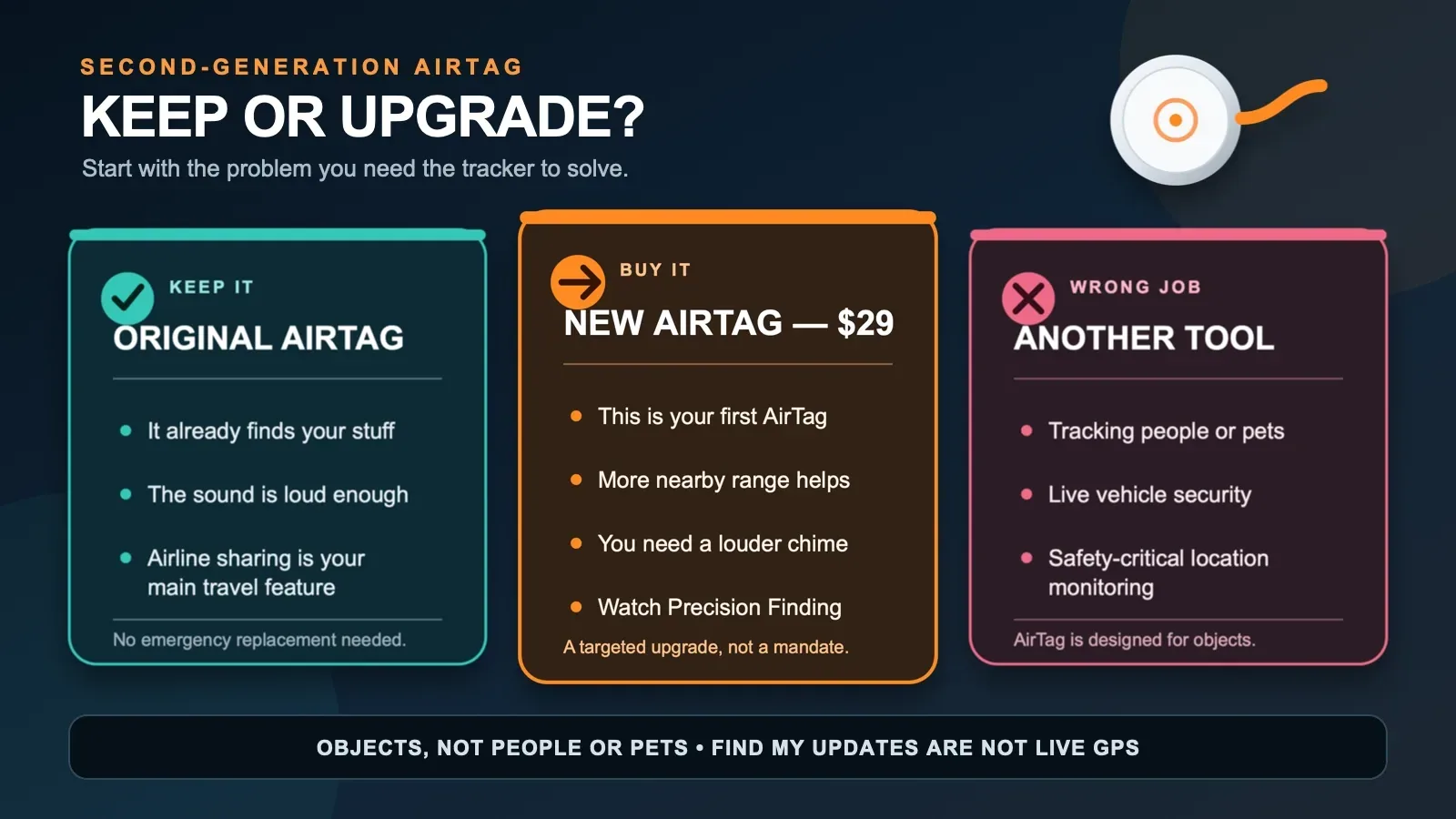
For most existing owners, my answer is: probably not yet.
Keep your original AirTag if:
- It already helps you find your keys, luggage, camera bag, or other gear.
- You mainly care about seeing the last reported location in Find My.
- The current speaker is loud enough in the places where you use it.
- You do not need Precision Finding from an Apple Watch.
- You were considering an upgrade only for Share Item Location.
The new model becomes a more meaningful upgrade if:
- You regularly reach the edge of Precision Finding range before it connects.
- You often have trouble hearing the original AirTag inside bags, furniture, or a vehicle you own.
- You have a compatible Apple Watch and want wrist-based Precision Finding.
- You are replacing an aging, damaged, or unreliable original anyway.
- You are buying your first AirTag and want the current model at the same starting price.
This is an improvement purchase, not an emergency migration. The original AirTag did not suddenly forget how to find your keys because a newer one appeared.
The Travel Feature Worth Learning Before the Airport
Share Item Location is the feature travelers should understand, even though it is not exclusive to the new AirTag.
If a checked bag is delayed, Find My can create a temporary web page showing the item’s available location. Apple says more than 50 airlines can accept these links through supported workflows. The link can stop when you are reunited with the item, when you end sharing manually, or after seven days.
That does not replace the airline’s delayed-bag report. It gives the airline another piece of information that may help its authorized staff locate the bag.
Here is the practical sequence I would use:
- File the delayed-baggage report with the airline and save the report number.
- Open Find My on your iPhone.
- Tap Items, then choose the AirTag named Luggage.
- Tap Share Item Location and follow the onscreen instructions to create the temporary page.
- Give the link to the airline through the support channel it tells you to use.
- Stop sharing after the bag is returned if Find My has not already stopped it.
Apple notes that you cannot create a Share Item Location page while the item is within proximity of the device sharing your location. That means you may not be able to run the entire process at home with the suitcase beside you. You can still learn where the control lives before the trip.
Airline participation, staff access, regional availability, and the airline’s actual recovery process can vary. Treat the link as a useful recovery tool, not a guarantee or a replacement for the baggage claim number.
My Five-Minute AirTag Travel Drill
The worst time to learn a recovery feature is while standing at baggage claim after everyone else’s suitcase has arrived.
Before the trip, run this short check:
- Name the AirTag Luggage instead of leaving it with a vague name.
- Open Find My, tap Items, and confirm Luggage appears under the correct Apple Account.
- Play the sound once so you know what the new chime sounds like.
- Try Find Nearby or Precision Finding with the compatible device you plan to carry.
- Check that Find My does not show a low-battery warning.
- Learn where Share Item Location appears, even if proximity prevents you from creating a test link.
- Place the AirTag in a protected interior pocket where it will stay with the bag.
You are ready when you can answer yes to three questions: Can I see the item in Find My? Can I make it play a sound? Do I know where the airline-sharing control is?
That tiny rehearsal is more useful than memorizing every specification.
It Can Be More Than a Key Finder—Within Limits
AirTag makes sense for belongings that are easy to misplace or painful to replace:
- House keys and the shared family car keys
- Checked luggage and carry-on bags
- Camera, drone, or music gear cases
- Backpacks and work bags
- Bicycles and other personally owned equipment
- An umbrella or other shared household item
Apple also lets an owner share an AirTag with up to five people, which is useful for a genuinely shared item such as family keys, an umbrella, or a bicycle.
The possibilities are broad, but they are not endless.
Apple explicitly says AirTag is designed to track objects, not people or pets. Do not hide one on another person, slip one into a child’s belongings as a substitute for supervision, or rely on one as a pet-safety system. AirTag includes cross-platform unwanted-tracking alerts and can make a sound when separated from its owner because secret person tracking is exactly the kind of misuse Apple is trying to discourage.
Putting an AirTag with property inside a car you own may occasionally help you learn where that property was last detected, but it is not a dedicated anti-theft or real-time vehicle tracker. The same limitations apply: Bluetooth detection, intermittent Find My updates, and anti-stalking protections. Use the right safety tool for the job.
Compatibility Details to Check Before Buying
The second-generation AirTag requires an Apple Account, Find My, and a compatible iPhone or iPad.
Apple’s current product specifications list iOS or iPadOS 26.0 or later, while Apple’s newer setup and Apple Watch support pages specify iOS, iPadOS, or watchOS 26.2.1 for second-generation AirTag features. The simple advice is to update your devices to the latest supported software before pairing and verify compatibility on Apple’s current support page.
If you use Android as your main phone, AirTag is not the natural choice. Android can receive unwanted-tracker alerts and can read Lost Mode details through NFC, but AirTag setup and ownership are built around an Apple Account and Apple’s Find My app.
Also remember that holders and key rings are normally sold separately. The $29 tracker is the inexpensive part; the tiny accessory that attaches it to your keys may be where the shopping cart starts getting ideas.
My Buying Verdict
If you constantly lose your keys and already use an iPhone, the new AirTag is an easy $29 problem-solver to consider.
If you travel with checked luggage, carry cameras, instruments, drones, or other expensive gear, it can do much more than rescue keys from a couch. The better nearby finding and louder speaker make the new model more useful at the moment you are close to the missing item but still cannot see it.
If you already own the original and it works, keep it. Share Item Location still gives travelers an important recovery option, and the original remains useful. Upgrade when the extra range, louder sound, or Apple Watch Precision Finding solves a problem you actually have.
That is the honest story of the second-generation AirTag. It is not magic, it is not a people tracker, and it is not a tiny police detective for your car. It is a better finder for your stuff—and for a lot of us standing in the doorway without our keys, that is more than enough.
Sources
- Apple Newsroom: Apple introduces new AirTag with expanded connectivity range and improved findability — published January 26, 2026; rechecked August 9, 2026.
- Apple: AirTag product page and technical specifications — accessed August 9, 2026.
- Apple Store: Buy AirTag — current U.S. pricing checked August 9, 2026.
- Apple Support: Share the location of a lost item in Find My on iPhone — accessed August 9, 2026.
- Apple Support: Use Apple Watch to find an AirTag (2nd generation) — accessed August 9, 2026.
- Apple Support: How to add an AirTag to Find My — accessed August 9, 2026.