Trust & transparency
Evidence & disclosures
Evidence basis: Hands-on test. Colin personally used the product, process, aircraft, software, or location described.
Based on auditing and changing my own AI blog workflow against Google’s people-first guidance; it does not prove independent SEO or audience gains.
Sources checked: Aug 20, 2026
Linked references: 4 explicit sources in the article.
I Put My AI Blog Pipeline Through Google's People-First Test
TLDR
- Google is not saying “never use AI.” Its guidance says the useful question is whether the result is original, reliable, and made primarily to help people.
- My own writing pipeline was good at turning notes into organized drafts, but it could still skip the most important pause: why should this post exist, and what can I add that a generic AI answer cannot?
- I added a people-first questionnaire to Auto Blog Studio before the Generate button, plus review checks for original value, reader outcome, visuals, and interaction.
- You can use the scorecard in this post on one of your own drafts. If the score is weak, do not ask AI to make the article longer. Give the article a better reason to exist.
There is a wonderfully dangerous button in almost every AI writing tool: **Generate**.
You paste in a topic, press the button, and a few seconds later you have headings, bullet points, a conclusion, and roughly 1,200 words that nobody technically asked to read.
I know this because I built my own version of that button.
Auto Blog Studio is my local writing pipeline for taking rough notes, research, and project ideas and turning them into editable ColinMichaels.com drafts. It saves source material, creates CMS-ready files, prepares image directions, and keeps me from accidentally treating “the AI returned something” as the same thing as “the post is ready.”
But while reading Google's guide to [creating helpful, reliable, people-first content](https://developers.google.com/search/docs/fundamentals/creating-helpful-content), I realized the pipeline still began one step too late.
It started with material.
It needed to start with questions.
Before We Go Any Further, Score Your Idea
Pick a draft you have open right now. Give yourself one point for every honest **yes**:
- I can name the exact person this is for and the situation they are in.
- I would still want to publish this if Google sent it zero visitors.
- I have direct experience, a test, an artifact, an observation, or an honest opinion to add.
- The post offers something a normal AI answer would not give the reader.
- The reader will be able to make a decision or do something after reading.
- At least one example comes from the real world instead of being invented to fill space.
- A visual will explain one important relationship faster than another paragraph would.
- The reader gets to score, choose, compare, fill in, test, or change something.
- Important claims are connected to trustworthy sources.
- The title accurately promises what the article delivers.
- I have removed at least one section that existed only because articles are “supposed” to have it.
- I would send this to a specific person without apologizing for wasting their time.
Your score
- **10–12:** The idea probably has a reason to exist. Now make the execution live up to it.
- **7–9:** There is a useful post in here, but it needs more proof, specificity, or participation.
- **4–6:** You may have a topic rather than an article.
- **0–3:** Do not make it longer. Go experience, test, build, compare, or ask better questions first.
I also made a [standalone interactive version of this scorecard](./people-first-draft-check.html) so the questions can be checked and scored without doing the math in your head.
Google Is Not Saying “AI Bad, Human Good”
The most useful part of Google's guidance is that it does not turn this into a purity test.
Google's current [guidance on generative AI content](https://developers.google.com/search/docs/fundamentals/using-gen-ai-content) says generative AI can be useful for research and for adding structure to original work. The warning is about producing many pages without adding value. Google's broader people-first guide asks creators to evaluate the content itself and to think about **Who, How, and Why**.
That distinction matters.
A person can manually write a dull, copied article. An AI can help organize a genuinely useful experiment. The tool does not decide whether the result deserves a reader's time.
The process does.
Google's newer guide for visibility in generative AI search makes the same point in even plainer language: create [non-commodity content that provides value beyond common knowledge](https://developers.google.com/search/docs/fundamentals/ai-optimization-guide). That phrase—**beyond common knowledge**—is where this gets interesting.
If a reader can get the whole value of my post by asking a blank chatbot window one sentence, what exactly did I publish?
The Uncomfortable Test of My Own Pipeline
Here was the old simplified flow:
Notes → Generate draft → Edit → SEO → Images → Publish package
That is safer than mass publishing because there is still editing and review. It keeps source notes attached and never publishes automatically. But it can still reward the wrong behavior.
If the starting notes are mostly facts, the machine is very good at making those facts look finished. Smooth transitions and neat headings can hide the fact that the idea itself never became more valuable.
So I changed the first stage:
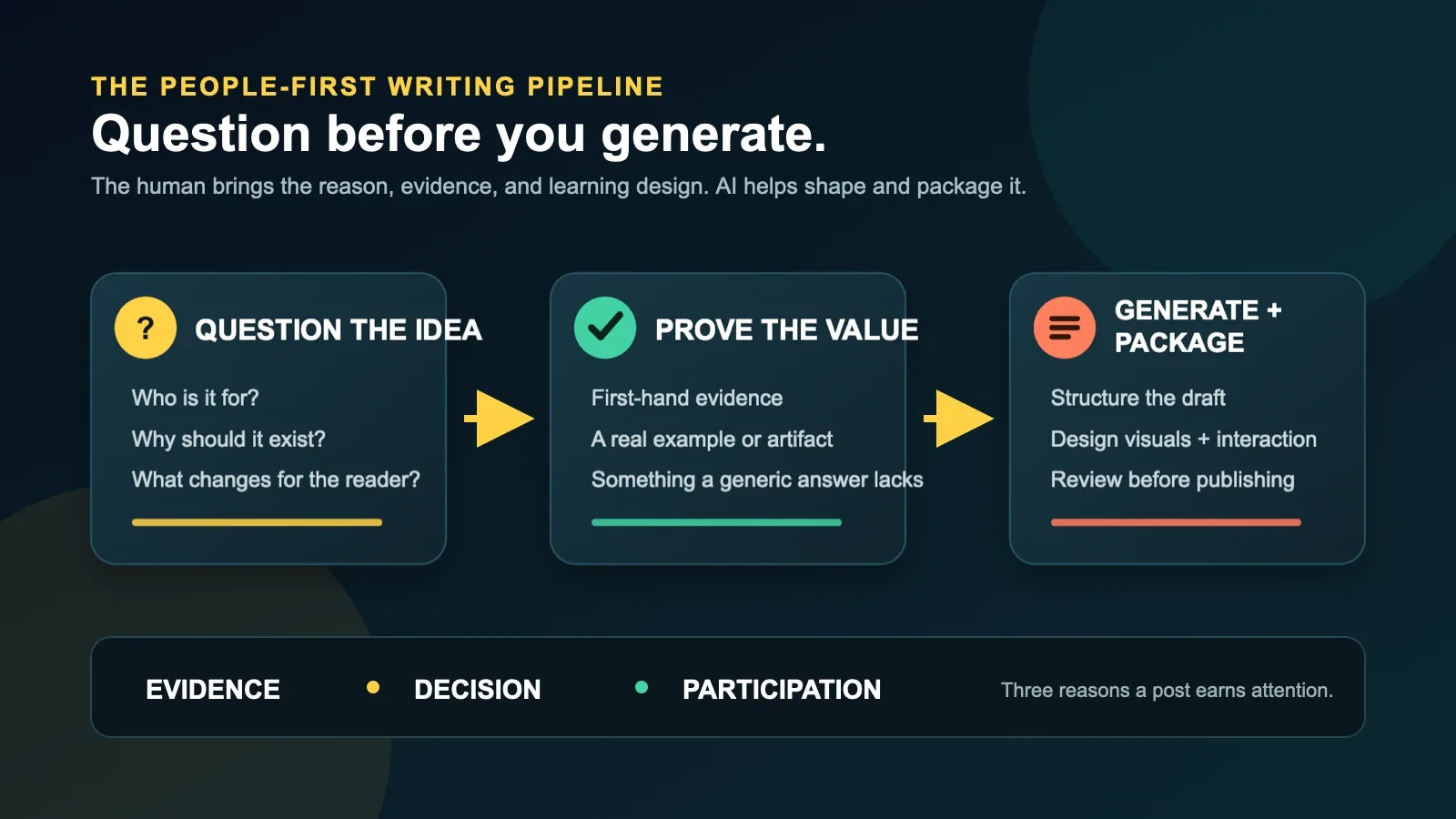
Question the idea → Find our evidence → Design the learning experience → Generate draft → Edit → Package
The difference looks small on a workflow diagram. In practice, it changes what the AI is allowed to do.
The AI is no longer being asked, “Please make this topic sound like an article.”
It is being asked, “Here is why this should exist, here is what I actually know, here is what the reader should be able to do, and here is how they will participate. Help me shape that into a draft.”
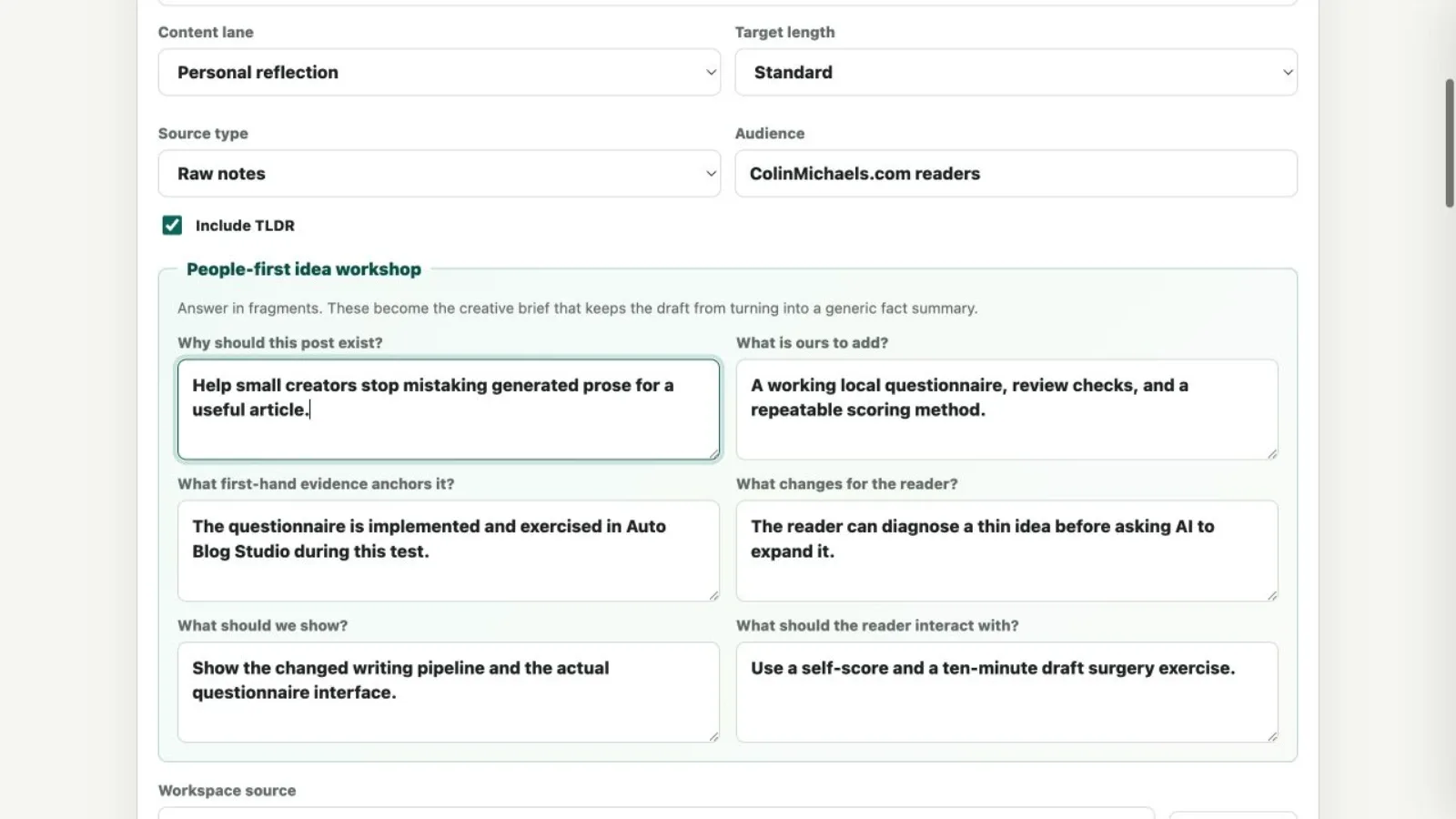
The Six Questions Now Sitting Before My Generate Button
1. Why should this post exist?
Not “what keyword does it target?” Not “is this trending?”
Why would I publish it even if search traffic did not exist?
For this post, the answer is that small creators are being offered faster and faster ways to produce more material, while the harder skill is deciding what is worth producing. I wanted a practical brake pedal for my own system.
2. What is ours to add?
This question looks for the thing a generic answer cannot provide: a build, a failure, a comparison, a photograph, a local workflow, a stubborn opinion, or a result.
Here, the unique part is not summarizing Google's page. It is showing the actual questions I added to the tool and letting readers use the same review method.
3. What first-hand evidence anchors it?
Google's people-first self-assessment asks whether content demonstrates first-hand expertise and whether it provides original information, research, or analysis.
That does not mean every blog post needs a laboratory.
It can be a screenshot of the setting you changed. A before-and-after result. The receipt from the mistake. A short log of what happened. The exact checklist you used. A sentence admitting which part you do not know yet.
For this article, the evidence is the working Auto Blog Studio change, the new review checks, and the package this post came through.
4. What changes for the reader?
“They understand the topic” is usually too vague.
Can they choose a safer setting? Diagnose a bad draft? Build the first version? Explain the tradeoff to somebody else? Avoid wasting an afternoon?
After this post, the reader should be able to score an idea, identify what is missing, and write a better creative brief before asking AI for prose.
5. What should we show?
Every post does not need an infographic carnival. Sometimes a photograph or screenshot is the proof.
But visuals should have jobs. A diagram can show sequence. A comparison can show a tradeoff. An annotated screenshot can show exactly where to click. A before-and-after can make improvement visible.
If an image only says “technology is happening” in glowing blue light, it is decoration. Pretty decoration, perhaps, but still decoration.
6. What should the reader interact with?
Interaction does not have to mean building a giant web application.
It can be a scorecard, a choose-your-path question, a printable worksheet, a five-minute experiment, a prompt that forces a prediction before revealing an answer, or a checklist readers apply to their own work.
The important part is that the reader does something with the idea instead of only receiving it.
A Before-and-After Example
Imagine the topic is: **How to use AI to write blog posts**.
The fact-printing version probably covers choosing a tool, entering a prompt, generating an outline, editing, checking grammar, and publishing. None of that is necessarily wrong. It is simply available everywhere.
The people-first version begins differently:
- Take one real draft generated from thin notes.
- Let the reader predict which sections feel generic.
- Show the original prompt and output.
- Mark the claims that need sources.
- Add one first-hand story, one actual screenshot, and one reader exercise.
- Show the revised draft and explain what was deleted—not only what was added.
- Give the reader a scorecard to repeat the process.
Both articles use AI. Only one creates an experience that belongs to its author.
My New Rule: Every Post Needs Evidence, a Decision, and Participation
This is the short version I want to remember:
Evidence
What proves this is connected to the real world?
Decision
What will the reader be better able to choose or do?
Participation
What will the reader test, score, compare, or change?
If a post has all three, AI can be extremely helpful. It can organize messy notes, expose missing steps, suggest a clearer order, turn a transcript into a draft, or create alternate explanations for a confusing part.
If a post has none of the three, AI mostly helps the emptiness arrive faster.
Try a Ten-Minute Draft Surgery
Open a draft and set a timer for ten minutes.
Minutes 1–2: Circle the commodity sections
Mark every paragraph that could appear unchanged on 100 other sites.
Minutes 3–4: Find the proof
Highlight every sentence based on something you personally did, saw, built, measured, photographed, or decided. If there is no highlight, you have found the real problem.
Minutes 5–6: Give the reader a job
Add one question, prediction, score, comparison, or tiny experiment.
Minutes 7–8: Replace one explanation with a visual
Do not add a random image. Show the process, decision, difference, or result.
Minutes 9–10: Rewrite the promise
Make the title and opening promise the specific value the post now delivers.
Then delete anything that no longer earns its place.
Where AI Still Belongs in This Process
I am not removing AI from Auto Blog Studio. That would be a strange conclusion for a post about improving an AI-assisted tool.
I am moving AI farther downstream.
The human supplies the reason, evidence, stakes, taste, and honest uncertainty. AI helps with structure, alternatives, cleanup, consistency, metadata, and production handoffs. Then the human reviews the result as a reader, not as somebody impressed that a button worked.
I also want the creation process to be visible when it matters. Google's guidance recommends giving readers context about how automation was used when someone might reasonably wonder how the content was made.
So here is the disclosure for this post: I chose the idea, researched the primary Google sources, designed and implemented the questionnaire in my local writing app, decided the examples and exercises, and edited the argument. AI helped research, structure, draft, code, package, and generate visual assets. Nothing was automatically published.
Final Thought
The internet does not need another person proving that AI can produce paragraphs.
We have settled that one.
The interesting challenge is building a process that makes us bring more of ourselves to the work: the test we actually ran, the doubt we have not resolved, the screenshot that proves the setting exists, the choice the reader has to make, and the little interaction that turns reading into learning.
My pipeline can still generate a draft.
Now it has to earn the right to.
Sources
- [Creating helpful, reliable, people-first content — Google Search Central](https://developers.google.com/search/docs/fundamentals/creating-helpful-content) (last updated December 10, 2025; accessed July 11, 2026)
- [Google Search's guidance on using generative AI content on your website](https://developers.google.com/search/docs/fundamentals/using-gen-ai-content) (last updated December 10, 2025; accessed July 11, 2026)
- [Google's guide to optimizing for generative AI features on Google Search](https://developers.google.com/search/docs/fundamentals/ai-optimization-guide) (accessed July 11, 2026)
- [SEO Starter Guide — Google Search Central](https://developers.google.com/search/docs/fundamentals/seo-starter-guide) (accessed July 11, 2026)