Trust & transparency
Evidence & disclosures
Evidence basis: Manufacturer-supplied evidence. Material claims or demonstrations came from the company responsible for the product and are not independent results.
Based on current ChatGPT Projects behavior; the family-trip setup is a proposed one-week experiment, not a completed productivity result.
Sources checked: Aug 20, 2026
Linked references: 1 explicit source in the article.
How I’d Use One ChatGPT Project to Organize a Real-Life Mess
I do not need another explanation of how powerful AI is.
I need to know whether it can help me find the hotel confirmation, remember that one person cannot leave before Friday, keep the packing list current, and stop making me explain the same trip four times.
That is why ChatGPT Projects finally makes sense to me as a normal-life tool.
OpenAI describes Projects as workspaces that keep related chats, files, and instructions together. That sounds like a feature description. The more useful translation is this:
Give one ongoing mess one home.
The plain-English reason to use a ChatGPT Project
I have not run this exact family trip experiment yet, so this is not a victory lap disguised as a tutorial. It is the setup I would use to find out whether Projects actually helps.
TLDR
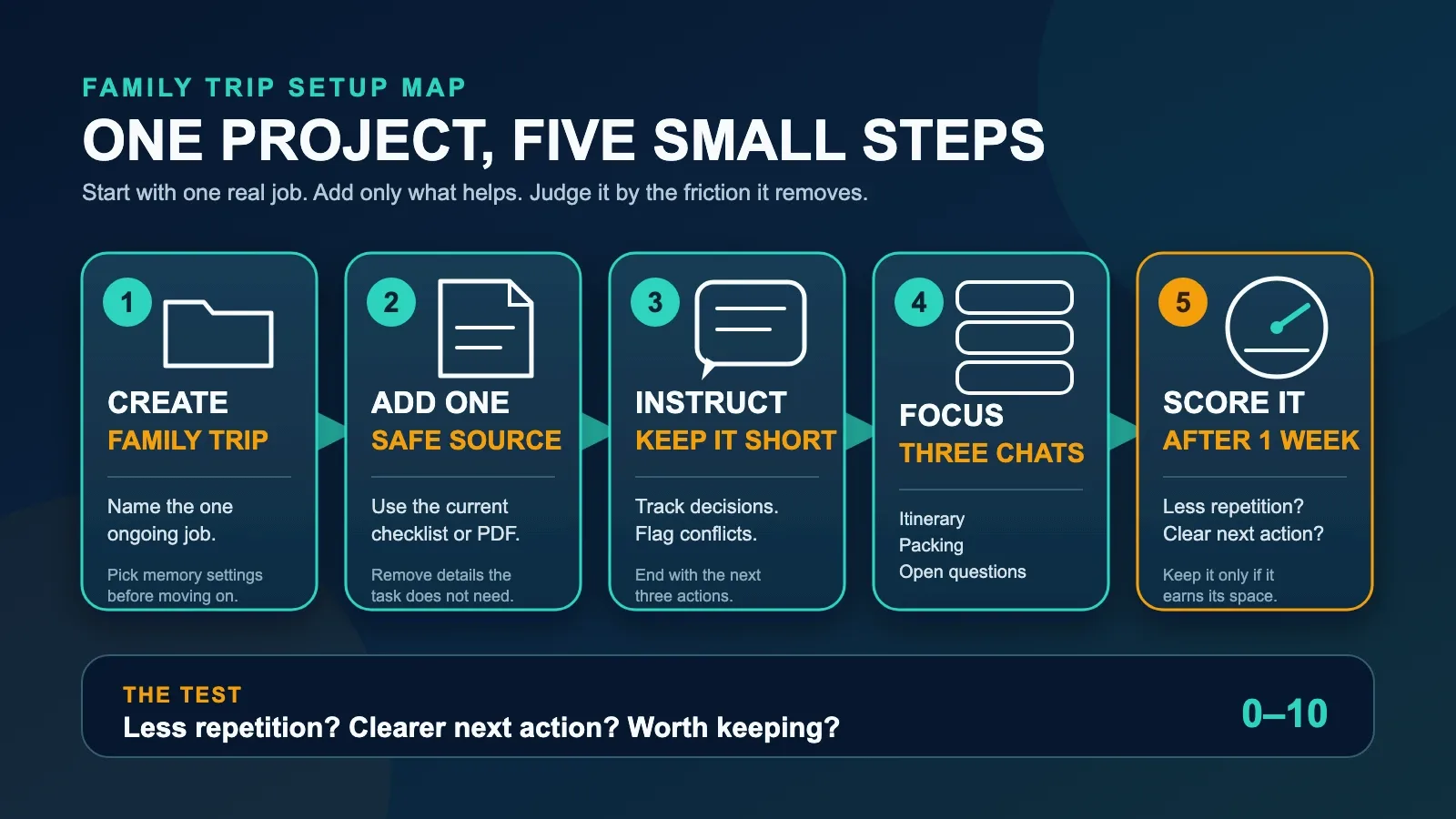
- Create one Project called `Family Trip`.
- Give it one clear instruction instead of a biography.
- Add one safe checklist or PDF, not your entire digital life.
- Use separate chats for the itinerary, packing, and open questions.
- Ask for one current decisions list with the next three actions.
- Score the setup after a week. If it does not reduce repetition or make the next action clearer, simplify it or delete it.
Projects are available across free and paid ChatGPT plans, but file limits, tools, memory behavior, and sharing details can vary. You also need to be signed in.
The Mess I Would Give It
My test case would be a family trip because family-trip planning is just complicated enough to become ridiculous.
There is usually a confirmation email, a rough itinerary, a school or work schedule, a packing list, a screenshot somebody sent, a list of places everyone wants to visit, and at least one important detail hiding in a text message nobody can find.
The problem is not that any one document is difficult.
The problem is that the truth is spread across seven places, three people, and one person's memory. That person is frequently tired.
A random ChatGPT chat can answer one question about the trip. A Project can keep the trip itself together while I ask many different questions over time.
That is the difference worth testing.
My 15-Minute Setup
1. Create `Family Trip`
I would click **New project** in the ChatGPT sidebar, name it `Family Trip`, and choose an icon and color I can spot quickly.
If ChatGPT offers a choice between default memory and project-only memory, I would stop and read it before clicking through. OpenAI says project-only memory has to be chosen when a new Project is created; an existing Project cannot simply be switched to it later.
Project-only memory keeps the context boundary tighter around that Project, but it is not a magic privacy vault. Account settings, workspace settings, the files I add, and whether I share the Project still matter.
2. Give the Project one job
Project instructions should tell ChatGPT how to help inside this Project. OpenAI says those instructions apply only there and override global custom instructions.
Help me organize this family trip. Keep answers short and practical. Maintain one running list of decisions, deadlines, and missing information. If two files or chats conflict, point it out instead of guessing. Ask before assuming dates, prices, names, or booking details. End each planning answer with the next three actions.
Copyable Family Trip project instruction
That is enough.
I would not spend 45 minutes designing a personality for my vacation robot. The Project has a job, not a backstory.
3. Add one safe source
OpenAI says a Project can use PDFs, spreadsheets, documents, images, or pasted text as sources. I would start with one item: the current trip checklist or a simple planning PDF.
Starting with one file matters because dumping a whole folder into AI creates a new version of the same mess. I want to learn whether the Project can use one source correctly before I give it five more.
I would also remove details it does not need. A planning checklist might need travel dates and a hotel name. It probably does not need passport numbers, full credit-card statements, passwords, a child's school ID, or somebody's complete medical history.
Organization is not permission to overshare.
4. Open three focused chats
I would keep the chats inside the same Project, but I would not put every question into one endless conversation.
My first three chats would be:
- `Itinerary and Deadlines`
- `Packing and Shopping`
- `Questions We Still Need to Answer`
That gives each conversation a clear purpose while the Project keeps access to the relevant files, instructions, and prior context.
If I already had an eligible trip chat somewhere else, ChatGPT can move existing chats into a Project. OpenAI says a moved chat inherits the Project's instructions and file context.
5. Ask for the first useful artifact
I would not begin with, “Plan my perfect family trip.” That prompt invites confident decoration before the facts are settled.
I would start here:
Read the checklist I added. Do not plan the whole trip yet. Make one list with three sections: Decide Now, Decide This Week, and Decide Later. Flag anything missing or contradictory. End with the next three actions.
The first prompt I would use
That answer becomes the first useful artifact: not a fantasy itinerary, but a map of what the family actually needs to decide.
If the answer is good, ChatGPT lets me save a response back into the Project's sources. I would save the current decisions list so a later chat can reuse it.
What Changes After That
Before the Project, I might ask for packing help in one chat, paste the dates into another, and later wonder which answer used the correct hotel information.
After the Project, I still have separate conversations, but they belong to the same job. The files and instructions live with them. I can continue on another device. I can return later without rebuilding the entire setup from memory.
That does not guarantee a correct answer. It reduces the amount of context I have to reconstruct every time.
That is a smaller promise than “AI will plan your life.” It is also a much more useful one.
The One-Week Scorecard
I would test the Project for one week and score these five questions from 0 to 2:
- **Findability:** Could I find the current answer without hunting through random chats?
- **Repetition:** Did I have to explain the same dates, people, or constraints again?
- **Current list:** Did I end the week with one usable decisions list instead of several competing versions?
- **Contradictions:** Did ChatGPT flag conflicting details instead of quietly choosing one?
- **Next action:** Did each planning session end with something specific I could do?
A `0` means no help. A `1` means partly. A `2` means yes.
- **8-10:** Keep the Project. The system is earning its space.
- **5-7:** Simplify the files, instructions, or chat structure.
- **0-4:** Delete it and use a normal checklist. Technology does not receive participation trophies.
The score is not scientific. It is a quick way to judge the feature by the friction it removes instead of the number of buttons it has.
Where I Think People Will Go Wrong
Uploading everything on day one
More context is not always better context. Old confirmations, duplicated lists, and screenshots with stale prices can make the Project noisier. Start with the current source and add another only when it answers a real question.
Treating memory like a perfect database
Project memory helps ChatGPT draw from chats and files in the same Project. It does not make every detail automatically correct, current, or visible in a neat list. For dates, prices, names, bookings, and deadlines, ask it to point back to the source and flag uncertainty.
Using one giant chat
The Project is the container. The chats can still have jobs. A short itinerary chat is easier to revisit than a 300-message conversation that started with sunscreen and ended with rental-car insurance.
Sharing before cleaning it up
Projects can be shared, with availability and limits depending on the account and plan. Before inviting anyone, I would check the files, chats, instructions, and current sharing settings. A shared planning space is useful only when everyone is supposed to see what is inside it.
Keeping it forever
OpenAI says deleting a Project permanently deletes its files, chats, and instructions. That deserves care, but it also means I should decide what happens after the trip.
I would save anything that needs to live elsewhere, then remove the Project when it no longer has a job.
This Works Beyond a Trip
The same structure could work for:
- `School Year Prep` with supply lists, schedules, and school PDFs.
- `Moving House` with quotes, room measurements, and a change-of-address checklist.
- `Wedding Planning` with vendor notes, deadlines, and open decisions.
- `Family Care` with appointment questions and non-sensitive task lists.
- `Home Repair` with estimates, photos, and a running decision log.
I would still begin with one Project, one source, and one useful output.
The goal is not to move every part of life into ChatGPT. The goal is to give one messy job a better home.
The One-Project Challenge
Pick one thing that will still matter next week.
Create a Project with the same name as that job. Add one safe source. Paste a short instruction. Ask for a current list of decisions and the next three actions.
Then stop setting it up and use it.
After seven days, score it.
If you spend less time repeating yourself and more time doing the next useful thing, keep it. If the Project becomes another drawer full of digital junk, clean it out.
That is how I want to judge AI features now.
Not by how impressive they sound in a demo.
By whether one real-life mess is a little less messy when I am done.
Source and Review Note
This draft is based on OpenAI's [Projects in ChatGPT](https://help.openai.com/en/articles/10169521-projects-in-chatgpt) help page, accessed July 19, 2026. The supplied brief identified the page as updated July 15, 2026; the live page displayed the relative label `Updated: 5 days ago` during verification.
Projects is an evolving ChatGPT feature. Plan limits, available tools, sharing behavior, memory settings, and menu labels can change. Recheck the help page before publishing, and review ChatGPT's current data controls before adding personal material.