Trust & transparency
Evidence & disclosures
Evidence basis: Researched analysis. The article compares public evidence and does not claim hands-on testing unless a section says otherwise.
Draws on USDA and university Extension guidance plus PlantNet documentation; the AI garden workflow is proposed, not a field-tested planting plan.
Sources checked: Aug 20, 2026
Linked references: 7 explicit sources in the article.
How I'd Use AI to Plan a Better Garden, Indoors and Out
TLDR
I do not need AI to hallucinate a tomato. I need it to remember which window gets afternoon sun, turn a pile of plant tags into an inventory, and help me decide what gardening job makes sense next.
That is where AI can be genuinely useful around the house and yard. It can organize observations, compare plant needs with a real space, turn trusted local guidance into a calendar, sketch a small bed, ask better questions about a struggling plant, and keep a garden journal from becoming another abandoned notebook.
My rule is simple:
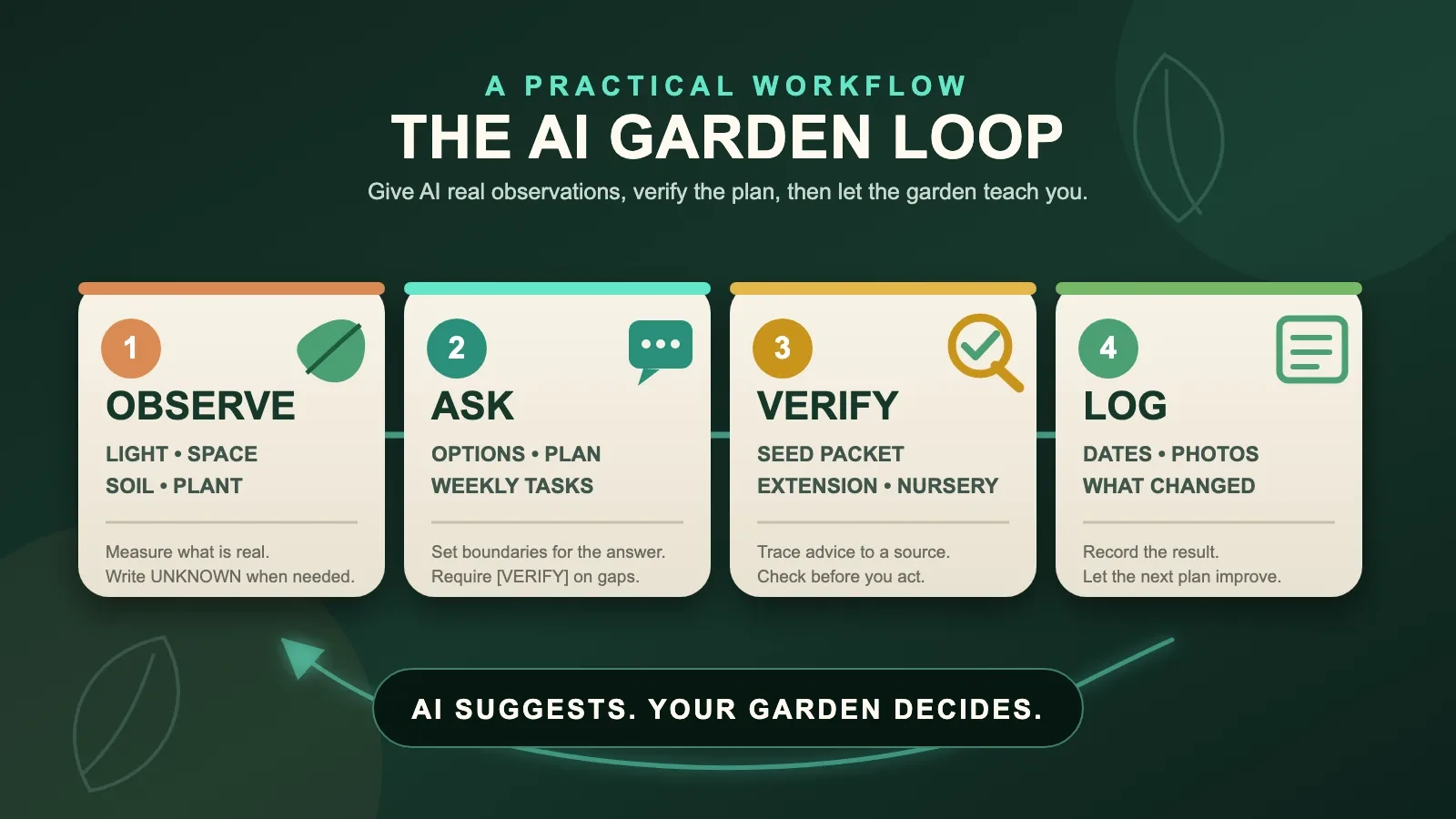
- Observe the real space. Measure light, dimensions, soil, dates, and what the plant is doing.
- Ask AI for a bounded plan. Tell it to mark missing facts as [VERIFY] instead of guessing.
- Verify before acting. Check the seed packet, plant tag, USDA map, local Extension guidance, nursery, or diagnostic clinic.
- Log what happens. The garden gets the final vote.
If you want to try this today, make one Garden Snapshot and use AI on one small project. Do not redesign the entire yard before lunch.
AI Is Better at Organizing a Garden Than Being the Garden
Gardening creates a surprising amount of information.
There are plant names, varieties, sun patterns, pot sizes, seed depths, spacing instructions, frost dates, rainy seasons, soil results, watering checks, pest photos, and the small matter of remembering what I did last Tuesday.
As an applications developer, that part looks familiar. It is a collection of inputs, constraints, decisions, and results. AI is good at helping sort those things into a usable shape.
What it cannot do is stand in the yard and feel that one corner staying soggy after every storm. It does not notice the blast of afternoon heat bouncing off a wall unless I tell it. It does not know that the plant tag blew away or that I moved the pot three weeks ago.
The USDA Plant Hardiness Zone Map makes this boundary clear even without mentioning AI. A hardiness zone is a useful guide based on average annual extreme minimum temperatures, but the USDA warns that small microclimates may not appear on the map and that no map replaces what a gardener learns through hands-on experience.
That is exactly how I would treat AI: useful map, terrible substitute for noticing things.
My Honest Limit on This Guide
This is the system I would use to organize a home gardening project. I am not presenting it as a season-long experiment from my own yard, and I am not claiming it increased a harvest by some suspiciously precise percentage.
The examples below are working templates built from current USDA, university Extension, and Pl@ntNet guidance. The result I can honestly give you today is a better process for collecting facts, asking for help, and checking the answer.
Healthy plants still require the unglamorous part: looking at them.
Start With a Garden Snapshot, Not a Giant Prompt
The fastest way to get generic gardening advice is to give AI generic information.
“What should I plant?” sounds simple, but the answer changes with location, month, light, space, soil, water, goals, pets, and whether we are talking about a sunny raised bed or a bookshelf six feet from a window.
Before asking for recommendations, I would make a Garden Snapshot for one space.
- Where: indoor or outdoor, city or region, and USDA zone if known
- Space: shelf, pot, patio, raised bed, or ground; include dimensions
- Light: window direction or observed hours of direct sun, plus shade and reflected heat
- Water and drainage: nearby water source, drainage problems, and how quickly pots or soil dry
- Soil: potting mix, native soil, raised-bed mix, and any soil-test result
- Plants: names, varieties, pot sizes, spacing, dates, and current condition
- Goal: herbs for cooking, vegetables, flowers, privacy, easier care, or simply keeping the current plants alive
- Unknowns: anything I have not measured yet
Use the field list above as your Garden Snapshot. UNKNOWN is an acceptable answer. An honest blank is safer than a confident invention. I also included a separate copyable worksheet in the download package.
Here is the first prompt I would use:
Help me organize this home-garden snapshot. Do not recommend plants or treatments yet. First, turn my notes into four sections: confirmed facts, unknowns, possible constraints, and the five most useful things to observe next. If a detail is missing, write [VERIFY]; do not guess. My notes: [PASTE SNAPSHOT].
That prompt asks AI to slow down. Before it becomes an advice machine, it has to become a filing cabinet.
Seven Gardening Projects Where AI Could Actually Help
1. Build a Plant Inventory I Might Keep Updated
For houseplants, I would start with a simple inventory:
- Temporary ID such as living-room-01
- Plant name and variety, if known
- Room and window direction
- Pot size and drainage
- Date acquired or repotted
- Last soil-moisture check
- New growth or visible problem
- One next action
AI can turn rough notes or voice dictation into a clean table, group plants by room or light level, and create a short weekly check list.
The important word is check. I would not ask it to declare that every pothos gets water each Sunday.
The University of Minnesota Extension's indoor-light guide explains that plants in lower light grow more slowly and use less water. Its practical advice is to feel the soil to avoid overwatering. That means the useful reminder is “check these three pots,” not “pour one cup into everything because the calendar said so.”
2. Match Plants to the Light I Actually Have
AI can help compare a list of plants with a light map, but first I need observations.
For an indoor shelf, I would record the window direction, the distance from the glass, and direct-sun periods at perhaps 9 a.m., noon, and 4 p.m. For an outdoor bed, I would take photos or notes at the same times on a clear day and include buildings, fences, trees, and reflective walls.
Then I could ask:
Compare my observed light with the light requirements in the plant notes below. Group the plants into good match, possible match, and poor match. Quote the observation that supports each decision. Do not upgrade a plant because it “might adapt.” Mark conflicts [VERIFY]. Observed light: [NOTES]. Plant requirements from trusted sources or tags: [PASTE].
This is much stronger than asking AI which plant “likes a bright room.” Bright to me, bright to a camera, and bright enough for a tomato are three different things.
3. Turn Local Guidance Into a Planting Calendar
This may be the most useful outdoor project.
AI can make a calendar easy to read, but it should not invent the dates. I would first collect a current local planting guide, my frost or heat constraints, seed-packet instructions, and the time I realistically have.
Florida is a good example of why location matters. UF/IFAS says planting dates differ across North, Central, and South Florida. The same guide recommends planning around the site, water, soil, crops, and dates; for the vegetable-garden site it describes, at least six hours of sun is a starting point.
I would paste the relevant local guide into the request and say:
Using only the source material below, build a month-by-month planting calendar for my region and space. Include crop, start seed indoors or sow/transplant outside, spacing from the source or packet, expected task week, and a [VERIFY] column. Do not supply a date or spacing value that is not in my source. Flag conflicts between my packet and the regional guide. Source: [PASTE]. My region and space: [DETAILS].
AI is doing the tedious transformation. UF/IFAS, the seed company, the weather, and my actual yard are supplying the facts.
4. Sketch a Small Bed Before I Buy Too Many Plants
A measured bed is a nice bounded planning problem.
Suppose the example space is a 4-by-8-foot raised bed. I would give AI the exact inside dimensions, north direction, sun pattern, paths I need to reach, and the final spacing from each seed packet or trusted guide.
Then I would ask for two layouts:
- A simple grid with plant counts
- A plain-English explanation of why tall, climbing, spreading, and short-season plants occupy each area
I would also ask it to calculate whether the suggested count physically fits. AI is surprisingly capable of proposing 47 plants for a space that would feel crowded with seven, so arithmetic deserves adult supervision.
This is also where companion planting needs restraint. The University of Minnesota Extension's research-based companion-planting guide describes useful approaches such as pairing short-season crops with later crops and using diversity for specific goals. It also warns that many online charts are not well supported.
So I would ask for the reason behind a pairing—space, timing, support, pollinators, or a documented pest relationship—not mystical vegetable friendship.
5. Use Photos to Ask Better Questions, Not Declare a Diagnosis
AI vision can help identify a plant or narrow possible problems. A specialized example is Pl@ntNet, which compares uploaded plant photos with community-validated images and returns ranked possibilities.
The photo process matters. Pl@ntNet recommends sharp, well-framed pictures, adequate light, and multiple angles or plant parts when possible. Its own limitations page says identification errors can remain and coverage is incomplete.
For a struggling plant, I would photograph:
- The whole plant in its setting
- A healthy and affected area together
- The top and underside of a leaf
- The stem and soil surface
- Roots only if the plant is already being removed or repotted
Then I would add history: recent watering, fertilizer, repotting, temperature change, weather, drainage, and when the symptom started.
Penn State Extension's diagnostic guidance explains why that context matters. Similar symptoms can come from environment, care, insects, disease, animals, or several causes together. For a serious or persistent problem, the right next step may be a local Extension office or plant diagnostic clinic—not another increasingly dramatic prompt.
I would never apply a pesticide, fertilizer, pet-sensitive plant treatment, or major pruning plan because one photo produced a confident paragraph.
6. Make a Weekly Garden Check That Responds to Conditions
AI can turn the inventory and calendar into a short weekend walk-through.
Mine would look something like this:
- Check soil moisture for specific containers
- Inspect leaf undersides on two plants that showed damage
- Compare seedlings with their expected stage
- Photograph the same corner of the bed
- Harvest or succession-sow anything due this week
- Verify one purchase before buying it
The list should change when conditions change. A rainy week, heat wave, vacation, new grow light, moved pot, or fresh transplant should update the plan.
This is where AI earns its keep: not by issuing more chores, but by shrinking a messy garden into the five things worth noticing next.
7. Keep an Experiment Log So Next Season Starts Smarter
Gardening has many variables, which makes memory unreliable and experimentation useful.
I would keep a simple log:
- Date and location
- What I observed
- What I changed
- Why I changed it
- Photo before
- What happened after three days, one week, or one month
- Keep, adjust, or stop
AI can summarize that log at the end of a month and find patterns: one shelf dries faster, a bed holds water, seedlings become leggy in one room, or a variety struggled during a certain weather stretch.
Those are observations, not scientific proof. Still, they are far more useful than beginning every season with “I think I planted that over there last time.”
The Prompt I Would Save
After making the snapshot, this is the reusable prompt I would keep:
You are helping me organize a small home gardening project. Use only the facts and source material I provide. Separate confirmed facts, reasonable options, and items that require verification. Never invent my plant variety, climate, planting date, spacing, soil condition, pest, disease, or treatment. Mark missing information [VERIFY]. Give me: (1) the three best next actions, (2) why each action fits my observations, (3) what source or physical check should confirm it, and (4) what I should log afterward. Garden snapshot: [PASTE]. Trusted source material: [PASTE].
That is not a magic gardening prompt. It is a guardrail against the most common problem: asking a broad question and receiving a specific-sounding guess.
My 30-Minute AI Garden Challenge
I would begin with one shelf, one patio group, or one bed.
Minutes 0–10: Observe
- Measure the space.
- Record light or window direction.
- List the plants or seed packets.
- Note drainage, soil, and one visible question.
- Take useful photos if identification or plant health is involved.
Minutes 10–20: Ask
- Paste the Garden Snapshot.
- Ask AI to organize facts and unknowns first.
- Request no more than three next actions.
- Require [VERIFY] on missing information.
Minutes 20–25: Verify
- Check the plant tag or seed packet.
- Check the USDA map for general hardiness context.
- Find the current local Extension calendar or guide.
- Stop if the answer depends on a diagnosis, chemical treatment, or fact you cannot confirm.
Minutes 25–30: Choose One Action
Move one plant gradually, label one container, schedule one soil check, draw one bed, or call the local Extension office.
Then write down what you changed and when you will look again.
That is enough for the first session. Gardens already grow slowly. The planning software is allowed to calm down too.
How I Would Score the Plan
Give the AI-assisted plan 0, 1, or 2 points in four areas:
- Local: Does it use my real region, light, space, and conditions?
- Traceable: Can I connect important advice to a source, tag, packet, measurement, or observation?
- Doable: Are the next actions small enough to complete and observe?
- Cautious: Does it mark uncertainty instead of hiding it behind confident language?
A score of 7 or 8 means the plan is ready for one small experiment. A score of 5 or 6 means I would fill the gaps. Below 5, I would go back outside and collect better information.
The score is my practical check, not a horticultural standard. Its job is to keep an attractive answer from outrunning the evidence.
What I Would Not Hand Over to AI
I would not let it identify an edible plant with certainty from one photo.
I would not use it to declare a mushroom, berry, or wild plant safe to eat.
I would not apply a pesticide or fertilizer without checking the label, plant, problem, timing, and local guidance.
I would not assume a USDA zone tells me my planting month, sun, soil, rainfall, or microclimate.
I would not trust a companion-planting chart simply because it uses a lot of green checkmarks.
I would not put a plant where a child or pet can reach it until I verified its safety with an authoritative source.
And I would not buy twelve new plants because AI made twelve charming suggestions. That is how a planning project becomes a hostage situation with pots.
Final Thought
The best use of AI in a garden may be wonderfully unexciting.
It can remember the labels, clean up the notes, compare the constraints, build the calendar, and remind me what to inspect. That leaves me with the part that actually matters: walking around, touching the soil, noticing new growth, and learning what this particular plant does in this particular place.
AI suggests. The garden decides.
That feels like the right division of labor.
Sources
- USDA: How to Use the Plant Hardiness Zone Map
- UF/IFAS: Vegetable Gardens by Season
- University of Minnesota Extension: Lighting for Indoor Plants and Starting Seeds
- Pl@ntNet: Create and Share an Observation
- Pl@ntNet: Strengths and Weaknesses
- Penn State Extension: Diagnosing a Plant Problem 101
- University of Minnesota Extension: Companion Planting in Home Gardens
Sources were checked August 3, 2026. Gardening guidance changes by location, season, plant, and conditions, so verify the details that apply to your own space before acting.