
Trust & transparency
Evidence & disclosures
Evidence basis: Manufacturer-supplied evidence. Material claims or demonstrations came from the company responsible for the product and are not independent results.
Based on OpenAI Academy’s official course and help pages; the one-hour plan is my recommendation, not a completed learner outcome study.
Sources checked: Aug 20, 2026
Linked references: 3 explicit sources in the article.
The Easiest Way I’d Start Learning AI in 2026 If I Were Brand New
TLDR
If I were brand new to AI, I would not begin with a giant prompt library, a stack of technical videos, or somebody yelling that I am already behind.
I would start with OpenAI Academy’s AI Foundations course, give myself one focused hour, and bring one ordinary task I already need to do. The official estimate for the course is 60–75 minutes, so the goal of that first hour is not to race for a certificate. It is to learn a little, try one useful thing, and leave with a result I can check.
My beginner formula is simple:
- One course
- One real task
- One reviewed result
- One prompt worth saving
That is enough for day one.
I Do Not Think Beginners Need More AI Noise
Learning AI in 2026 can feel like arriving late to a movie where everybody else claims to understand the plot.
There are prompt collections, tool comparisons, agent tutorials, daily feature updates, and videos with thumbnails suggesting your entire career will disappear before lunch. A curious beginner can spend an hour collecting advice and still never actually use AI for anything.
That is the trap I would avoid.
The first goal is not to become “an AI person.” The first goal is to make one small task easier without giving up your own judgment.
Maybe that task is turning rough notes into a checklist. Maybe it is rewriting a messy email. Maybe it is organizing study notes, outlining a side-hustle idea, or drafting a polite answer to a customer.
The task should be real, small, and easy for you to verify. Boring is good here. Boring is where useful habits are born.
What OpenAI Academy Actually Offers
OpenAI now has a much calmer starting point than random tips: OpenAI Academy courses.
According to OpenAI, the courses are free, self-paced, available globally to people with a ChatGPT account, and do not require a technical background or workspace membership. The initial learning path has three courses:
- AI Foundations — 60–75 minutes. A beginner introduction to AI, large language models, ChatGPT, prompting, context, reviewing outputs, and responsible use.
- Applied AI Foundations — 75–90 minutes. A next step for turning individual prompts into repeatable workflows with review points.
- Agents and Workflows — 75–90 minutes. A more advanced step for directing agents through structured tasks, setting boundaries, reviewing results, and reusing what works.
That sequence makes sense to me because it does not begin with “build an agent.” It begins with understanding the tool, giving it useful context, and checking what it gives back.
That last part matters. The useful skill is not merely getting an answer. It is knowing how to look at the answer and decide whether it deserves to survive.
My Honest Limit on This Guide
This is not a review of every lesson inside all three courses.
I reviewed OpenAI’s official course descriptions and turned that learning path into the first-hour plan I would use as a beginner. I am not going to pretend I completed three courses, earned a certificate, or discovered a secret shortcut.
The value I can add is the plan around the course: how to choose a first task, how to practice without getting overwhelmed, and how to decide whether the output is actually useful.
Start With AI Foundations—and Only AI Foundations
If you are new, start with the course labeled for people who are new.
This sounds obvious, but the internet has trained us to skip directly to the most advanced thing because “Agents and Workflows” sounds more exciting than “Foundations.” That is how you end up learning twelve new terms before you have written one decent prompt.
AI Foundations is the right first stop because it covers the habits underneath almost every useful AI task:
- Give a clear instruction.
- Add the context that changes the answer.
- Review what comes back.
- Use AI responsibly.
Those are not beginner skills that you later throw away. Those are the skills you keep using even when the tools become more capable.
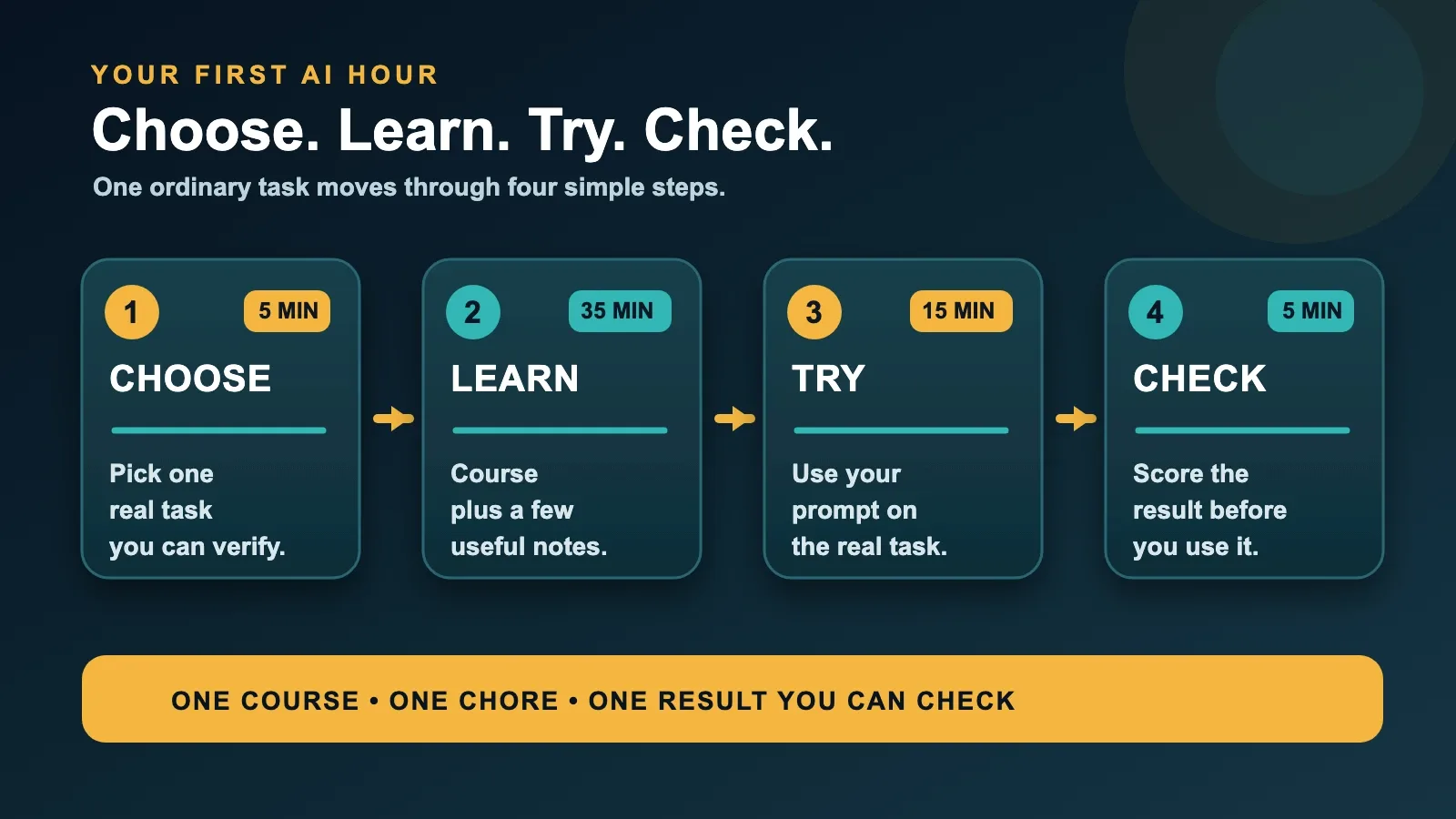
The One-Hour Starter Plan
The official estimate for AI Foundations is 60–75 minutes. I would still put only one hour on the calendar for my first session.
Why? Because “I need to finish an entire AI course tonight” feels like homework. “I am going to spend one hour learning and test one chore” feels possible.
Here is the plan.
Minutes 0–5: Pick One Task
Choose something you already understand well enough to judge.
Write one sentence:
By the end of this hour, I want AI to help me turn ___ into ___.
Good examples:
- Turn rough meeting notes into a clean checklist.
- Turn a rambling email into a calm, shorter version.
- Turn a chapter of study notes into practice questions.
- Turn a list of services into a first draft of a customer FAQ.
- Turn a side-hustle idea into five questions I need to answer.
Do not choose “learn everything about AI.” That task has no finish line and terrible lighting.
Minutes 5–10: Open the Course and Set Up Your Practice
Go to OpenAI Academy, choose AI Foundations, and enroll with the ChatGPT account you want connected to your course progress.
OpenAI says you can browse courses without signing in, but you need a ChatGPT account to start a course, save progress, and receive an eligible course-completion certificate.
Keep your practice task nearby in a note or document. Remove private names, passwords, account numbers, medical details, client secrets, school records, or anything else the exercise does not need.
Minutes 10–40: Learn With Your Task in Mind
Spend about 30 minutes in the course.
Do not try to write down every sentence. Look for ideas that change how you handle your chosen task.
I would keep one tiny note with four labels:
- Task: What am I asking the AI to do?
- Context: What does it need to know?
- Boundaries: What must it keep, avoid, or not invent?
- Check: What do I need to verify myself?
This four-line card is my way of organizing the practice. It is not an official OpenAI framework or a magic formula. It is simply a way to stop a prompt from becoming either too vague or three pages long.
Minutes 40–55: Try the Task for Real
Now use what you learned on the small task you picked.
Here is a fictional practice prompt for somebody cleaning up an email:
Rewrite these rough notes into a friendly email to a volunteer coordinator. Keep it under 150 words. Keep every date and time exactly as written. If something important is missing, mark it [VERIFY] instead of guessing. After the email, list two details I should check before sending. Notes: practice moved to Thursday; arrive at 5:30; bring water; ask whether parking lot B is open.
The example is fictional on purpose. It shows the structure without pretending I sent a real email or sharing somebody else’s information.
Notice what the prompt does:
- It names the task.
- It gives the audience.
- It sets a length.
- It protects dates and times.
- It tells the AI not to invent missing details.
- It asks for a final human check.
That is already more useful than “make this better.”
Minutes 55–60: Score the Result
Do not end the hour when the AI stops typing. End the hour when you have looked at the answer.
Score the result from 0 to 2 in four areas:
- Correct: Are names, numbers, dates, and facts right?
- Complete: Did it include the parts you actually needed?
- Clear: Would the intended reader understand it?
- Safe: Did it avoid invented facts, private details, or risky advice?
The maximum score is 8.
- 7–8: Useful. Make your edits and save the prompt as a starting template.
- 5–6: Close. Add missing context or a stronger boundary and try again.
- 0–4: Stop. The task may be too vague, too sensitive, or too hard to verify this way.
This scorecard is mine, not OpenAI’s. The numbers are not scientific. They are a speed bump between “the answer sounds confident” and “I checked the answer.”
The Best First Tasks Are Easy to Check
Your first AI task should not require blind trust.
If you already know what happened in a meeting, you can tell whether the checklist is accurate. If you wrote the rough email, you can tell whether the rewrite kept your meaning. If you have the textbook in front of you, you can compare practice questions with the chapter.
That makes these good starter tasks:
- Rewriting text you wrote yourself.
- Organizing notes you already understand.
- Brainstorming options you will evaluate.
- Creating a checklist from facts you provide.
- Asking for questions that expose gaps in your plan.
These are weaker first tasks:
- Making a medical decision.
- Interpreting a legal agreement you do not understand.
- Moving money based on an AI recommendation.
- Researching a purchase when price, stock, or specifications must be current.
- Producing a final school or work submission without checking it.
AI can still help in higher-stakes situations, but a beginner’s first exercise should not be something where a polished mistake can hurt somebody.
A First Hour for Four Different People
For a Parent
Bring a messy, non-sensitive note about a schedule change. Ask AI to turn it into a short family checklist or a polite message. Remove children’s full names, school IDs, medical details, and anything the task does not need.
Your check: Are every date, time, location, and request correct?
For a Student
Bring notes from a chapter you already read. Ask for five practice questions, then answer them without looking. Compare every question and explanation with the assigned material.
Your check: Did the AI stay inside the source, or did it quietly introduce outside claims?
For a Side-Hustler
Bring a one-paragraph description of your idea. Ask AI to turn it into customer questions you need to answer before spending money.
Your check: Are the questions practical, or are they generic business wallpaper?
For a Small Business Owner
Bring three common customer questions with private information removed. Ask for a friendly FAQ draft that clearly marks policies, prices, or promises that still need verification.
Your check: Did the draft invent a policy or promise your business does not actually make?
What I Would Not Do on Day One
I would not take all three courses back-to-back.
I would not download 500 prompts.
I would not start by asking AI to run my entire business, plan my medical care, choose an investment, or complete a school assignment for me.
I would not chase the certificate and skip the practice.
I would not assume a clean paragraph is a correct paragraph.
And I definitely would not compare my first hour with somebody online who has been using these tools every day for years. The internet already has enough imaginary races.
What Comes After the First Hour
If the first session helps, finish AI Foundations at your own pace.
Then repeat the same small task a few times. Improve the prompt. Notice what context matters. Notice what the AI tends to miss. Save the version that gives you a reliable starting point.
Only then would I move to Applied AI Foundations. That course is meant to help turn a useful prompt into a repeatable workflow. In normal language, that means taking something that worked once and building a sensible process around it—with review points still included.
Agents and Workflows comes after that. It is the course for more structured work: supplying context, defining outputs, setting boundaries, reviewing drafts, improving the process, and reusing successful patterns.
The order is the lesson:
- Learn the habits.
- Apply them to one recurring task.
- Add structure only when the simple version works.
That is a much healthier path than automating a mess at high speed.
The Certificate Detail That Is Easy to Misread
OpenAI Academy offers course-completion certificates for eligible courses, but OpenAI is explicit that these are not OpenAI Certifications and do not represent a formal OpenAI credential.
That does not make the course pointless. It just means the honest value is learning and completion—not pretending the certificate is a professional certification that OpenAI says it is not.
One more practical detail: course progress and completion certificates are connected to the email address on the ChatGPT account used to sign in. OpenAI says Academy accounts cannot currently be linked or merged after you begin, so check the account before starting if that matters to you.
My Beginner Rule
If I were starting from zero, I would use this rule:
One course. One chore. One result I can check.
That gives the hour a finish line.
You do not need to understand every model, feature, argument, benchmark, or job-title prediction. You need one experience where the tool helps, you stay in control, and you can explain why the result is good or bad.
That is real AI literacy.
Not jargon. Not hype. Not pretending the robot is your new vice president because it turned Tuesday’s notes into bullets.
Just a useful skill, practiced on something that matters to you.
Try This Tonight
- Block one hour.
- Open AI Foundations in OpenAI Academy.
- Pick one ordinary task you can verify.
- Write the task, context, boundaries, and check.
- Spend part of the hour learning and part of it practicing.
- Score the result for correctness, completeness, clarity, and safety.
- Save one useful prompt—or write down why it failed.
- Come back later and finish the course without rushing.
If you finish with one improved email, one cleaner checklist, one better set of study questions, or one smarter list of business questions, the hour worked.
You can learn the fancier parts later.
Sources and Date Note
- OpenAI Help Center: OpenAI Academy courses
- OpenAI Academy: course pathway
- OpenAI Academy: AI Foundations
The Help Center page was accessed July 30, 2026. On that visit, the page displayed the relative label “Updated: 15 days ago.” Because the accessible page did not provide an absolute update date, I am preserving the access date and the wording shown rather than converting it into a calendar date.
How experienced are you with AI?
- Pro
- Mediocre
- Newbie
- What is AI?