Trust & transparency
Evidence & disclosures
Evidence basis: Mixed evidence. The article combines more than one evidence type; the evidence summary identifies which claims come from which basis.
Combines my own ChatGPT privacy practices with current Memory and Temporary Chat behavior; readers should verify settings before sharing sensitive information.
Sources checked: Aug 20, 2026
ChatGPT Privacy for Beginners: When I Use Memory, When I Turn It Off, and When I Use Temporary Chat
TLDR
ChatGPT privacy gets a lot easier to understand when you stop thinking in legal-document terms and start thinking in normal-life terms.
Regular chat is fine for everyday help. Memory is useful for stable preferences you actually want ChatGPT to remember, like your writing style, your favorite format, or the kind of work you do. Temporary Chat is for the moments where you want help, but you do not want that conversation showing up in chat history, creating memories, or being used to improve models.
That does not make Temporary Chat a secret vault. OpenAI's Temporary Chat FAQ says temporary chats may still be retained for up to 30 days for safety purposes, and if you use GPT actions or connected tools, information sent to third parties is handled under those third parties' policies. So the practical rule is simple: use the right mode, share less than you think you need to, and do not put passwords, account numbers, private client data, or family drama into AI unless you have a very good reason.
Don't want to read, listen and watch the video below:
Why This Matters Right Now
AI tools are getting more personal.
That is not automatically bad. In fact, it is one of the reasons they are becoming useful for regular people. If ChatGPT remembers that you like short explanations, that you run a small business, that you are learning Spanish, or that you prefer checklists over essays, the next answer can be less generic.
But personalization changes the question from "Can this thing answer me?" to "What should this thing know about me?"
That is a real beginner question now.
Parents may use ChatGPT to draft school emails. Students may use it to study. Freelancers may use it to rewrite client proposals. Small business owners may use it for marketing, customer replies, hiring notes, or messy first drafts of things they do not want to write from scratch.
All of that can be helpful.
It also means a lot of normal people are about to share normal-life details with AI without fully understanding what gets remembered, what gets saved, and what belongs in a one-off chat.
So this is not a paranoid guide. I do not think the answer is "never use AI for anything personal." That is not how people use tools once they become useful. This is more like a seatbelt guide. You can still drive the car. Just do not act surprised that roads exist.
The Simple Mental Model
Here is the way I think about it.
Regular chat is for normal help. Memory is for stable preferences. Temporary Chat is for one-off help that should not shape future personalization.
A beginner privacy rule that is actually usable
That sentence does most of the work.
If I am asking ChatGPT to rewrite a public blog intro, brainstorm dinner ideas, explain a concept, or help me clean up a harmless email, regular chat is fine.
If I want ChatGPT to consistently know how I like things written, what kind of projects I build, or that I prefer plain-English explanations, memory can be useful.
If I am asking about something sensitive, temporary, embarrassing, legally weird, financially specific, medically personal, or connected to someone else's private life, I slow down. I either anonymize it, turn memory off, use Temporary Chat, or decide not to put it into AI at all.
That last option is still allowed. We are all very excited about technology, but "nope" remains a valid product setting in the human operating system.
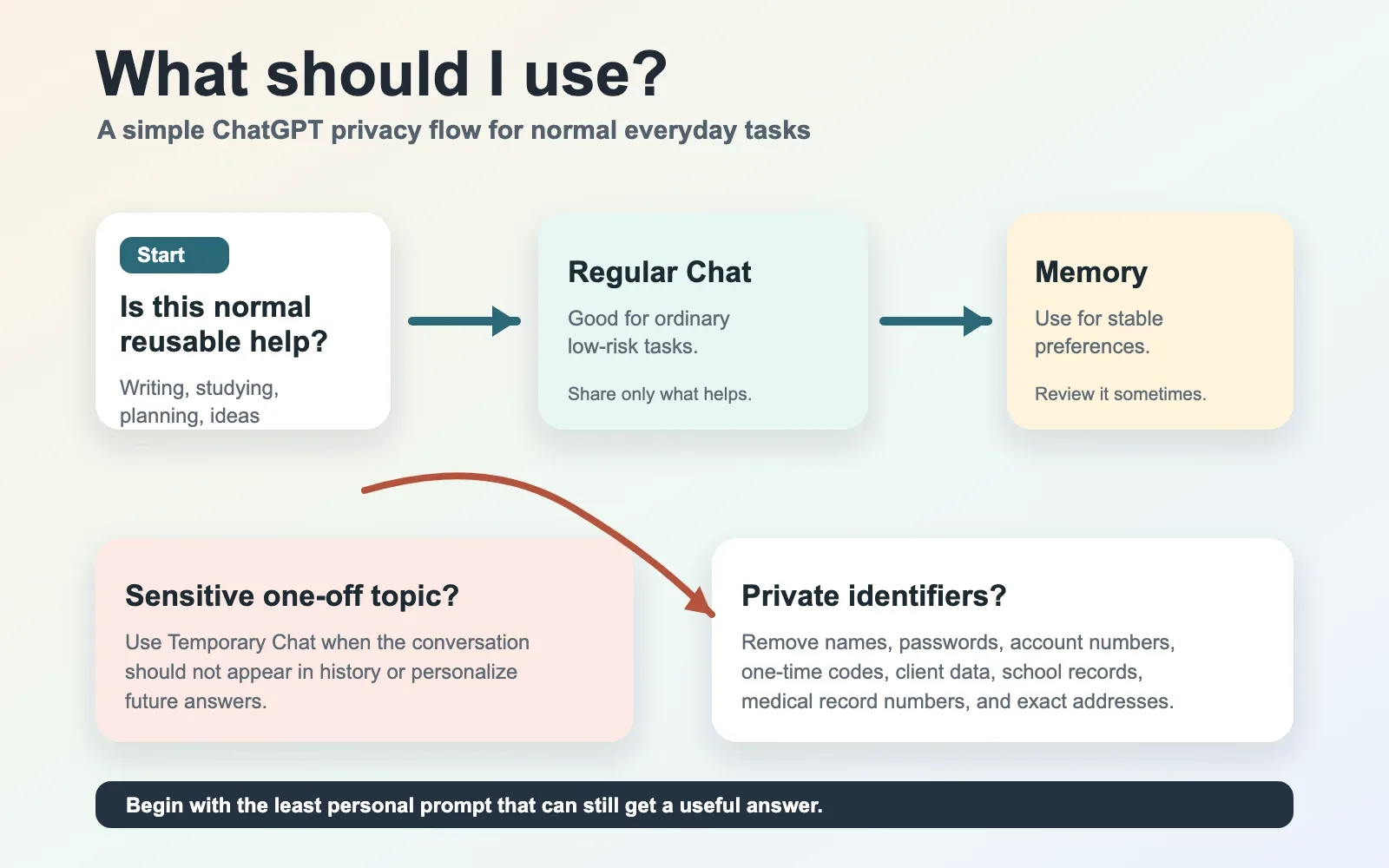
A Simple Decision Chart
The quick version is this: use regular chat for everyday reusable help, use memory for stable preferences, use memory off or Temporary Chat for sensitive one-off work, and pause before sharing client, student, medical, legal, financial, or family details.
What Memory Actually Means
Memory is not magic. It is not friendship. It is not a tiny diary elf living in your computer, thankfully.
Memory is context ChatGPT can use to personalize future answers. OpenAI's Memory FAQ says memory can help ChatGPT remember useful context from chats, files, and connected apps so you do not have to repeat yourself as often. It also says the newer memory system is rolling out across plans and countries, which means what you see may vary depending on your account, plan, and region.
The important part is this: memory is useful because it persists.
That is also why you should treat it carefully.
Good memory is the boring stuff that improves future help. For example, "I prefer short summaries first," "I am a beginner with spreadsheets," "I write for non-technical readers," or "When helping me plan meals, keep recipes simple."
Bad memory is anything you would be uncomfortable seeing accidentally resurface later. That includes private medical details, financial account information, client names, family conflict, school records, legal issues, passwords, security codes, and anything that belongs more to someone else than to you.
The Memory FAQ also makes an important point that beginners may miss: the memory summary is not necessarily every single thing ChatGPT can use. It is a high-level view meant to help you review and manage personalization. You can ask ChatGPT what it remembers, and you can manage memory in settings, but you should not assume the summary is a perfect mental map of everything the system might reference.
That sounds a little uncomfortable because it is.
The tradeoff is convenience. The privacy habit is review.
When I Would Use Regular Chat
I would use regular chat for everyday work where the details are not especially sensitive and where future personalization may actually help.
For a parent, that might be turning a rough note into a polite email to a teacher, as long as you avoid oversharing private details about the child. For a student, it might be asking for a study plan, a concept explanation, or feedback on a practice essay. For a freelancer, it might be drafting a project outline with the client name removed. For a small business owner, it might be brainstorming social posts, rewriting a service page, or making a simple FAQ.
The key is to separate usefulness from unnecessary exposure.
You can say "my client runs a local landscaping company" instead of naming the client. You can say "my child is having trouble with a class policy" instead of pasting a private school record. You can say "I need help writing a firm but kind message" without including every detail from the family group chat.
Most AI prompts do not need the full, messy, legally discoverable novel of your life.
They need the job, the audience, the tone, and the boundary.
When I Would Let Memory Help
Memory shines when the thing being remembered is stable, useful, and not too private.
For me, that would be writing preferences. I like practical explanations. I like drafts that sound human. I do not want corporate fog machine language. I prefer clear sections, short paragraphs, and a little personality when the topic allows it.
That kind of memory is genuinely helpful.
It means I can ask for a draft and spend less time saying, "Please do not make this sound like a brochure for a cloud software company that just discovered empathy."
For a student, useful memory might be the subject they are learning and the level they are at. For a small business owner, it might be the type of business and preferred brand tone. For a parent, it might be that they prefer short, respectful school messages. For a freelancer, it might be that proposals should be friendly, direct, and not stuffed with jargon.
That is the sweet spot: preferences, style, recurring goals, and harmless context.
When I Would Turn Memory Off
Turning memory off is useful when you are still okay using ChatGPT, but you do not want the conversation used for personalization.
This is the middle ground.
Maybe you are working through a sensitive draft. Maybe you are asking about a personal decision. Maybe you are comparing financial options and do not want that topic echoing into future replies. Maybe you are helping someone else and the details are not really yours to store.
In that case, turning memory off can reduce how much the conversation shapes future answers. But it is not the same thing as Temporary Chat.
Depending on your settings, the chat may still be in your history. Your broader data controls may still matter. Safety systems may still use limited context in certain situations. And if you paste private information into the chat, you still pasted private information into the chat.
That sounds obvious, but it is the exact place where people get tripped up. A privacy setting is not a time machine.
When I Would Use Temporary Chat
Temporary Chat is the clearest beginner tool for "help me with this, but do not make it part of my normal ChatGPT life."
OpenAI's Temporary Chat FAQ says Temporary Chats do not appear in history, do not create or use memories for personalization, and are not used to improve models. It also says OpenAI may keep a copy for up to 30 days for safety purposes, and that Custom Instructions can still apply if they are enabled.
So I would use Temporary Chat for one-off sensitive help.
If you want help drafting a message but do not want the conversation saved in history or used for training, start with Temporary Chat. That was the first simple takeaway from the source material, and I think it is the best beginner habit in the whole post.
I would use it for a difficult message, a private family situation, a rough medical question I am not ready to turn into part of my regular context, a sensitive work note, or a personal finance question where I have removed the identifying details.
I would still avoid pasting account numbers, full names, addresses, medical record numbers, passwords, one-time codes, private client documents, or anything where someone else reasonably expects privacy.
Temporary does not mean careless.
It means smaller footprint.
The Connected App Trap
The easiest way to misunderstand privacy is to focus only on ChatGPT and forget the tools around it.
The Temporary Chat FAQ specifically warns that if a GPT has actions, information sent to third parties through those actions is subject to the recipient's privacy policy. The Memory FAQ also talks about personalization sources such as chats, files, and connected apps, depending on plan and availability.
In normal-person language: the second you connect another service, you are no longer thinking about one privacy policy.
If ChatGPT is helping you draft a generic email, that is one thing. If it is connected to Gmail, searching files, calling an action, or passing data into some outside service, slow down.
That does not mean connected apps are bad. They can be extremely useful. But they deserve more caution because the data may move.
My rule would be: before connecting an app, ask what the app can access, what you are about to send, whether the task really needs that connection, and whether you would be comfortable with that data living in the other service too.
That one pause prevents a lot of accidental oversharing.
Four Normal Examples
A parent writing to a teacher can use regular chat for tone and structure. I would write, "Help me make this calmer and clearer for a teacher," then remove the child's full name, school ID, medical details, and anything that does not need to be there. If the topic is sensitive, I would use Temporary Chat.
A student studying for a test can use memory in a good way. "Remember that I am studying biology at a beginner level and prefer explanations with simple analogies" is useful. Uploading private school records or another student's work is a different question.
A freelancer can use ChatGPT to draft proposals, but should anonymize client details. "A local contractor needs a website refresh" is usually enough. The AI does not need the client's private budget email, login credentials, internal drama, or contract PDF unless there is a specific reason and permission to use it.
A small business owner can use memory for brand voice, services, and preferred tone. But payroll issues, customer complaints, employee health details, tax documents, and legal problems deserve a slower decision. Sometimes the right AI prompt is a sanitized summary. Sometimes the right answer is to call a professional human.
My Privacy Habit
My own habit is simple: start with the least personal version of the prompt that can still get a useful answer.
I do not begin by pasting everything. I begin by describing the task. If the answer is too generic, I add only the context that matters.
For example, I would rather say, "Help me write a kind but firm message to a client who missed a deadline" than paste the entire email thread. If I need better help, I can add, "The tone should stay professional because I want to keep the relationship." That gives the model the human goal without dumping the whole inbox into the blender.
This is probably the most useful privacy habit for beginners.
Add context slowly. Remove names first. Do not share secrets for convenience. Use memory for stable preferences, not private confessions. Use Temporary Chat when the topic should stay separate from your normal ChatGPT history and personalization.
What To Review Once In A While
Every so often, it is worth checking your ChatGPT settings.
Look at Memory. Ask what ChatGPT remembers about you. Review the memory summary if your account has it. Delete anything you do not want saved. Check whether chat history reference is on. Look at data controls, especially whether your content may be used to improve models. Review connected apps and remove anything you no longer use.
This is not exciting.
Neither is checking smoke detector batteries, and yet I remain personally in favor of not learning about them during the event.
The goal is not to become a privacy expert. The goal is to build a normal routine around a tool that is becoming more personal.
The Rule I Would Teach A Beginner
If you would be comfortable with ChatGPT using the information to help you again later, regular chat or memory may be fine.
If the information is useful but stable, put it in memory intentionally.
If the information is sensitive, temporary, private, or not really yours to share, use Temporary Chat, remove identifying details, or do not share it.
That is it.
You do not need to memorize every setting. You need a pause.
The future of AI is probably going to be more personalized, not less. That can be helpful. It can also get weird if we treat every chat box like a diary, lawyer, doctor, accountant, therapist, and junk drawer all at once.
Use the tool.
Just keep your hands on the steering wheel.
Source Notes
This post is based on OpenAI's Temporary Chat FAQ and Memory FAQ, accessed on July 7, 2026. The Temporary Chat FAQ showed "Updated: 26 days ago," and the Memory FAQ showed "Updated: 14 days ago." Because those are relative Help Center labels, the update dates in the original note are best treated as approximate: about June 11 or June 12, 2026 for Temporary Chat, and about June 23 or June 24, 2026 for Memory, depending on how the site counts days.
OpenAI is actively rolling out memory and personalization changes across plans and regions, so settings and availability may change. The practical habits here should age better than the exact menu labels.