Trust & transparency
Evidence & disclosures
Evidence basis: Manufacturer-supplied evidence. Material claims or demonstrations came from the company responsible for the product and are not independent results.
Based on OpenAI’s Finances documentation; this is a proposed first-look workflow, and every detected bill or subscription should be verified independently.
Sources checked: Aug 20, 2026
Linked references: 1 explicit source in the article.
OpenAI’s new Finances feature can connect eligible accounts and give you one place to look at spending, upcoming payments, recurring bills, and subscriptions. The simplest useful first question is:
What subscriptions am I paying for?
Then compare every line with one recent bank or credit-card statement. ChatGPT can help you find and organize the charges. It can still miss data, categorize something incorrectly, or misunderstand a transaction.
Finances is gradually rolling out to eligible Plus and Pro users in the United States on the web, iOS, and Android. ChatGPT cannot move money, pay a bill, make a trade, file taxes, or replace a qualified financial, legal, tax, or investment professional. Handle any subscription cancellation through the actual merchant or service.
My regular-person rule is simple: use AI to spot and sort; use the real account or statement to verify and act.
The Quiet Charges Are the Ones That Get Me
Most money leaks do not arrive with sirens.
They show up as $7.99 here, $14.99 there, and one annual renewal that appears just often enough to feel unfamiliar every single time. A streaming service we meant to cancel. An app we tried for a week. A cloud-storage plan attached to an old project. Individually, none of them looks dramatic. Together, they can turn a credit-card statement into an archaeological dig.
That is why OpenAI’s new Finances in ChatGPT feature caught my attention.
The interesting part is not that ChatGPT can talk about money. It could already explain a budget or help organize a debt-payoff idea. The new part is that eligible users can connect financial accounts through Plaid, view a dedicated dashboard, and ask questions grounded in the account data they chose to share.
In regular-person language: it can become a money dashboard you can talk to.
That sounds useful. It also deserves a slower, more careful setup than asking ChatGPT to rewrite an email.
My Honest Limit on This First Look
This is a first look based on OpenAI’s current documentation, not a review of my own connected accounts.
I am not claiming that I connected every bank, found a pile of forgotten subscriptions, saved a specific amount, or proved that every category was accurate. OpenAI says the rollout is gradual, so even an eligible U.S. Plus or Pro user may not see Finances yet.
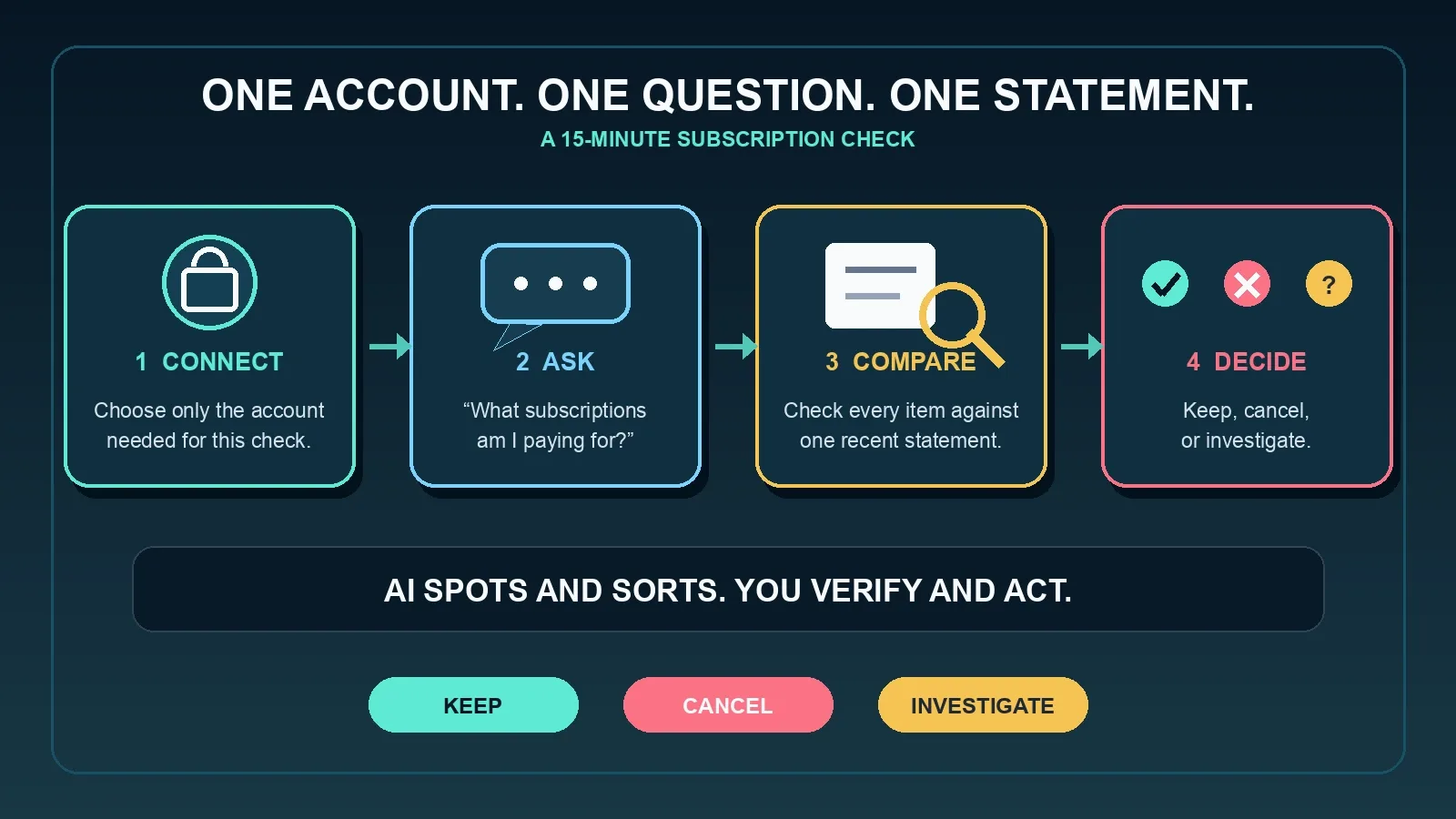
What I can do is turn the feature into a practical first experiment with clear boundaries: one account, one question, one statement, and one decision list.
That is enough to learn whether the feature helps without immediately handing it the keys to your entire financial life.
What the Finances Dashboard Can Show
According to OpenAI, the dashboard may show different widgets depending on the data available from your connected accounts. Those can include:
- Spending by category.
- Spending this month compared with recent trends.
- Upcoming payments.
- Active subscriptions, amounts, billing cadence, and expected next charge dates.
- Recurring household and utility bills.
- Net-worth changes over time.
- Portfolio allocation and daily market changes.
You can also ask questions in the Finances page or call the feature from a regular conversation with /finances or @finances.
For this article, I would ignore most of that on day one.
Net worth, investments, retirement contributions, debt strategies, and tax questions can become high-stakes quickly. The humble subscription list is a much better first test because you can compare it with records you already have and make the final decision yourself.
Before You Connect Anything, Decide Your Comfort Level
The feature uses Plaid to connect supported banks, credit cards, brokerages, and other financial institutions. You choose which accounts to connect.
That choice matters. “Available” does not have to mean “connect everything.”
I would start with the account where recurring household subscriptions are most likely to appear—probably one credit card—rather than linking every bank, loan, retirement account, and brokerage on the first try.
Before continuing, I would answer three questions:
- What am I trying to find? In this case, subscriptions and recurring bills.
- Which one account is most likely to contain them? Start there.
- Am I comfortable letting ChatGPT use that connected data under my current data-control settings? Check before you connect.
If the answer to the third question is no, stop. A feature can be convenient without being the right privacy trade-off for every person.
The 15-Minute Subscription Check
Here is the small experiment I would run.
Minute 0–3: Check Eligibility and Connect One Account
Finances is currently limited to eligible U.S. Plus and Pro users, and OpenAI says the rollout is gradual. It is available on the web, iOS, and Android.
If you see it, open Finances and select Get started. You can also type:
@Finances, connect my accounts
ChatGPT will guide you through connecting an account with Plaid. OpenAI says the initial sync usually takes a few minutes but can occasionally take several hours.
If the account is still syncing, do not treat a partial dashboard as a complete financial picture. Come back when the page shows a current sync time and no connection warning.
Minute 3–5: Ask One Specific Question
Start with OpenAI’s own simple example:
What subscriptions am I paying for?
Then make the output easier to check:
For each subscription you find, show the merchant, recent amount, likely billing cadence, next expected charge date if available, and the transactions you used. Mark anything uncertain instead of guessing.
That second sentence is not magic. It simply asks the AI to show its work and separate a confident-looking guess from something supported by the connected data.
Minute 5–10: Compare It With One Real Statement
Open a recent statement directly from the bank or credit-card company. Do the comparison privately, outside ChatGPT, unless you have a specific reason to share more information.
Check every item:
- Does the merchant appear on the statement?
- Does the amount match?
- Is it actually recurring?
- Is the billing cadence monthly, annual, or still unclear?
- Is a payment duplicated, pending, reimbursed, or a transfer rather than a real expense?
OpenAI warns that transaction categories can be wrong. Transfers, credit-card payments, reimbursements, and duplicate pending transactions can distort a spending breakdown. Some institutions may also provide balances without full transaction history, due dates, loan details, or other fields.
A neat dashboard is not the same thing as complete data.
Minute 10–15: Sort Every Charge Into Three Buckets
Give each verified item one label:
- Keep: I use it, recognize it, and accept the current price.
- Cancel: I no longer want it, and I will cancel through the merchant or service.
- Investigate: I do not recognize it, the amount changed, the cadence is unclear, or ChatGPT and the statement disagree.
Do not treat the ChatGPT list as a cancellation. Finish that step through the merchant or service. ChatGPT cannot pay the bill, move money, or change the financial account. That is a good boundary to remember.
The real result of this exercise is not an AI-generated list. It is a short human decision list you can act on in the correct account.
The Subscription Check Card
For each item, write down five things:
- Merchant name.
- Amount on the real statement.
- Monthly, annual, or uncertain.
- Still used: yes, no, or not sure.
- Action: keep, cancel, or investigate.
That little card is more valuable than a vague promise to “be better with money.” It turns a dashboard into a decision.
If you find only one charge you forgot about, the exercise may still be worth doing. If you find none, that is useful too: it tells you whether ChatGPT’s list and your statement agree.
Good Follow-Up Questions That Stay Practical
Once the first list checks out, I would stay with questions that are easy to verify:
- “What recurring bills are coming up before my next payday?”
- “Did any subscription amount change recently?”
- “Do I have any payments that look like duplicates?”
- “Which spending category changed the most this month, and which transactions caused it?”
- “What data did you use for this answer, and what might be missing?”
The last question may be the most important one.
OpenAI says answers based on connected financial data may cite the relevant source data. Ask for that evidence. If a number matters, follow it back to the account that owns the number.
Where I Would Slow Down
Finances can also help organize information and explain trade-offs around budgets, savings goals, debt payoff, major purchases, taxes, retirement contributions, and investments.
That does not turn ChatGPT into a fiduciary or adviser.
OpenAI explicitly says ChatGPT is not a registered investment adviser, broker-dealer, tax preparer, law firm, or fiduciary. It cannot file taxes or make trades. You remain responsible for the decision.
I would use it to prepare better questions, organize facts, and compare scenarios. I would not use one confident paragraph as the reason to change an investment, move retirement money, make a tax filing decision, or take legal action.
For those choices, bring the verified records and the organized questions to a qualified professional.
The Privacy Details Worth Reading Before You Click Connect
Financial data is not ordinary chat material. The privacy controls deserve more than a quick “yeah, yeah” while racing toward the dashboard.
OpenAI’s current documentation says:
- You can choose which supported accounts to connect.
- You can remove an individual account or disconnect Finances.
- Synced account data is deleted from OpenAI’s systems within 30 days after disconnection.
- Disconnecting does not remove financial information already present in your conversation history; those conversations must be deleted separately if you want them gone.
- Financial memories are a separate type of memory. You can view or delete them from the Finances page.
- Your existing ChatGPT model-training setting applies to conversations with Finances.
- Temporary chats do not access connected financial accounts and do not use or create memories.
That last point means Temporary Chat is not a private shortcut into the connected dashboard. It simply does not use the connected accounts.
My setup checklist would be:
- Review Settings > Data controls before connecting.
- Connect only the account needed for the task.
- Avoid adding extra personal context unless it improves the result enough to justify storing it.
- Review financial memories from the Finances page.
- If you disconnect, decide whether related conversations should also be deleted.
Convenience and privacy are not enemies, but they do have to negotiate.
What ChatGPT Finances Cannot Do
This boundary is wonderfully plain. ChatGPT cannot:
- Move money.
- Pay bills.
- Change account settings.
- Make trades.
- Change retirement contributions.
- Open or close financial accounts.
- File taxes.
- Act as your financial, legal, tax, or investment adviser.
It can help you see, ask, organize, compare, and plan. You still verify and act.
That is not a weakness in the feature. For an AI tool touching financial information, I consider it a healthy line.
My Regular-Person Verdict
The best first use of Finances in ChatGPT is not “tell me how to become rich.”
It is much more ordinary:
Show me what I am already paying for, and help me notice what deserves a closer look.
That is a job a conversational dashboard may handle well. It can gather recurring charges, make the list readable, and help you ask better follow-up questions.
The statement still gets the final vote. The merchant still handles the cancellation. A qualified professional still handles high-stakes financial, tax, investment, and legal decisions.
Start with one card, one question, and one recent statement. If the feature makes that little job clearer without asking you to surrender your judgment, then it has earned the right to help with the next one.
Source and Date Note
This first look is based on OpenAI’s official Finances in ChatGPT Help Center article, accessed August 3, 2026. The page displayed “Updated: 4 days ago” at the time of access. I am preserving that relative label instead of inventing an absolute update date.
Finances is rolling out gradually, so availability, screens, supported data, and controls can change. Recheck OpenAI’s current documentation before publishing or connecting accounts.
This article is for organization and general information, not financial, legal, tax, or investment advice.