Trust & transparency
Evidence & disclosures
Evidence basis: Researched analysis. The article compares public evidence and does not claim hands-on testing unless a section says otherwise.
Built from FAA and eCFR registration, Remote ID, TRUST, FRIA, B4UFLY, and LAANC sources; exact requirements depend on aircraft and use.
Sources checked: Aug 20, 2026
Linked references: 17 explicit sources in the article.
7 Checks Before You Fly
The first flight with a new or revived drone should begin with charged batteries and an open patch of sky—not a surprise about registration, Remote ID, or controlled airspace.
That surprise often starts earlier. A product page says “Remote ID ready.” A used listing says “no registration needed.” An older drone still powers on, so it feels ready to go. Those claims may be right, but none of them answers every question.
This guide is for first-time buyers, parents, used-drone shoppers, and returning hobbyists. These are the seven checks I would make before paying for the aircraft and again before taking off.
You can still compare cameras, flight time, obstacle sensors, and controllers. Just make sure the drone also fits the way you actually plan to fly.
TLDR
- Decide whether each planned flight is recreational, covered by a narrow qualifying educational exception, or under Part 107.
- Check the weight of the complete flying setup; being under 250 grams does not erase TRUST, airspace, or other flight rules.
- Identify the real compliance path: built-in Standard Remote ID, an add-on broadcast module, or flying an unequipped drone inside a FRIA.
- Match the exact make, model, declaration type, status, and serial range in the FAA’s live Declaration of Compliance list.
- For a used or updated drone, power it on and find the actual Remote ID serial number.
- Price the full legacy-drone solution, including a module, mounting, power, weight, and operating limits.
- Confirm registration, TRUST, ownership, airspace, and realistic places to fly before paying or taking off.
The biggest shortcut is simple: do not accept “Remote ID compatible” as proof. Check the official FAA record.
First, This Is Not a New 2026 Drone Rule
Remote ID remains important, but this is not a “new rules today” alert.
I rechecked the FAA’s main Remote Identification of Drones page, its recreational-flyer guidance, and the FAA’s Part 107 overview on July 10, 2026. The recreational page was updated March 18, 2026, and the Part 107 overview is dated July 6, 2026, but neither creates a new consumer Remote ID equipment path.
The operating requirements still come from 14 CFR Part 89; the practical compliance paths are explained below.
What does change is the live evidence around a particular flight: declarations can be amended, serial ranges differ, firmware support changes, FRIAs change, and airspace conditions are time-sensitive. That is why this checklist is still worth doing.
1. Decide How the Drone Will Actually Be Used
The first question is not which camera resolution you want. It is why the drone will be flying.
A flight conducted solely for personal enjoyment may qualify for the Exception for Limited Recreational Operations. Certain educational or research flights at qualifying schools, colleges, JROTC programs, and eligible community-based-organization programs can also use that exception. Other work, business, organizational, and educational uses will normally fall under Part 107. The FAA’s educational-user guidance explains the narrower school-related cases.
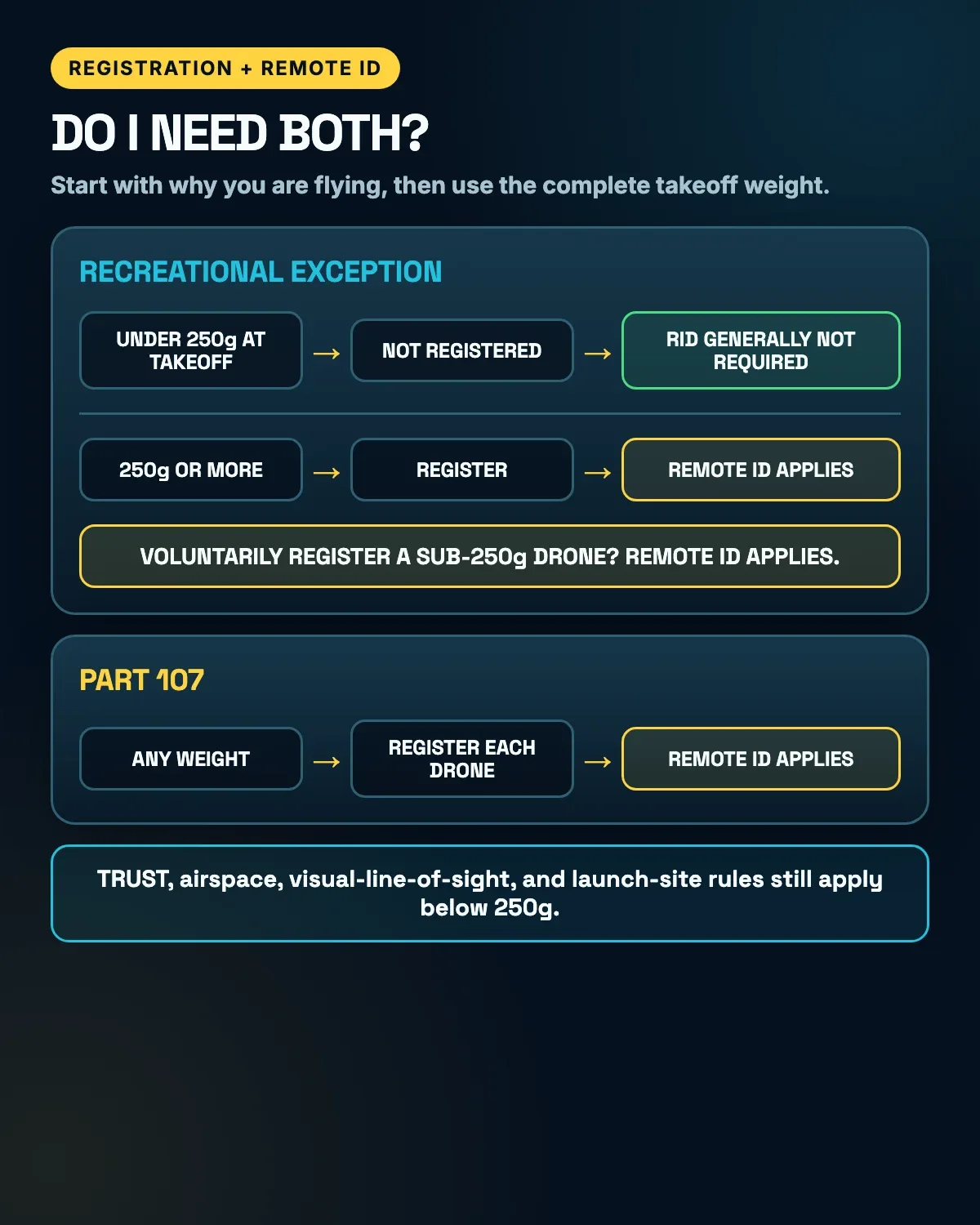
The difference matters because a lightweight recreational drone may not require registration. A drone operated under Part 107 must be registered regardless of weight.
It is also easy to assume that “nobody paid me” automatically makes a flight recreational. That is not always true. The FAA’s recreational-flyer guidance explains that the purpose of the flight matters. Taking photos to help sell a property, documenting something for an organization, or volunteering drone work for a nonprofit can be non-recreational even without a paycheck.
The FAA’s current advice is refreshingly direct: when in doubt, assume Part 107. Under Part 107, the person manipulating the controls needs a Remote Pilot Certificate with a small-UAS rating or must be directly supervised by someone who has one.
The reverse detail matters too. Holding a Part 107 certificate does not automatically replace TRUST if you choose to conduct a particular flight under the recreational exception. The free TRUST requirement follows the recreational flight, as the FAA also explains in AIM section 11-5-1.
Before buying or flying, ask one honest question:
Will every flight I have in mind be purely recreational, or does one planned use put me under Part 107?
If the answer is “mostly, but I may use it for a project later,” choose a drone and Remote ID plan that can support that future use. If you are relying on one of the limited educational cases, verify that your institution and operation actually qualify. It is cheaper than discovering later that the bargain drone only fits the narrowest version of your plans.
2. Check the Real Takeoff Weight
The registration exception is narrower than “small drone.” Under 14 CFR 48.15, the aircraft must be flown exclusively under the recreational exception and weigh 0.55 pounds or less at takeoff, including everything on board or attached. The FAA explains the practical line as less than 250 grams; at 250 grams or more, register it.
The useful number is the weight of the setup that actually takes off, including anything attached or carried. That can include:
- The installed battery
- Propeller guards
- Lights
- Landing gear
- A camera or action-camera mount
- A Remote ID broadcast module
- The module’s battery or wiring
A drone advertised at 249 grams may stay below the practical line in its basic configuration and cross it with a heavier battery or accessory. Suddenly the harmless little add-on changes the registration and Remote ID calculation.
Part 107 is simpler, although not necessarily more convenient: every drone operated under Part 107 must be registered, including drones below 250 grams. A tiny drone does not receive a Part 107 Remote ID exemption just for being adorable.
Under 250 grams also does not mean rule-free. Recreational pilots still need TRUST, still need to follow visual-line-of-sight and airspace rules, and still must follow property and launch-site rules and obtain permission where required.
There is another easy-to-miss detail. The FAA says Remote ID applies to drones that are required to be registered or are registered. If a sub-250-gram recreational drone is voluntarily registered, it must comply with Remote ID even though its weight alone would not have required registration.
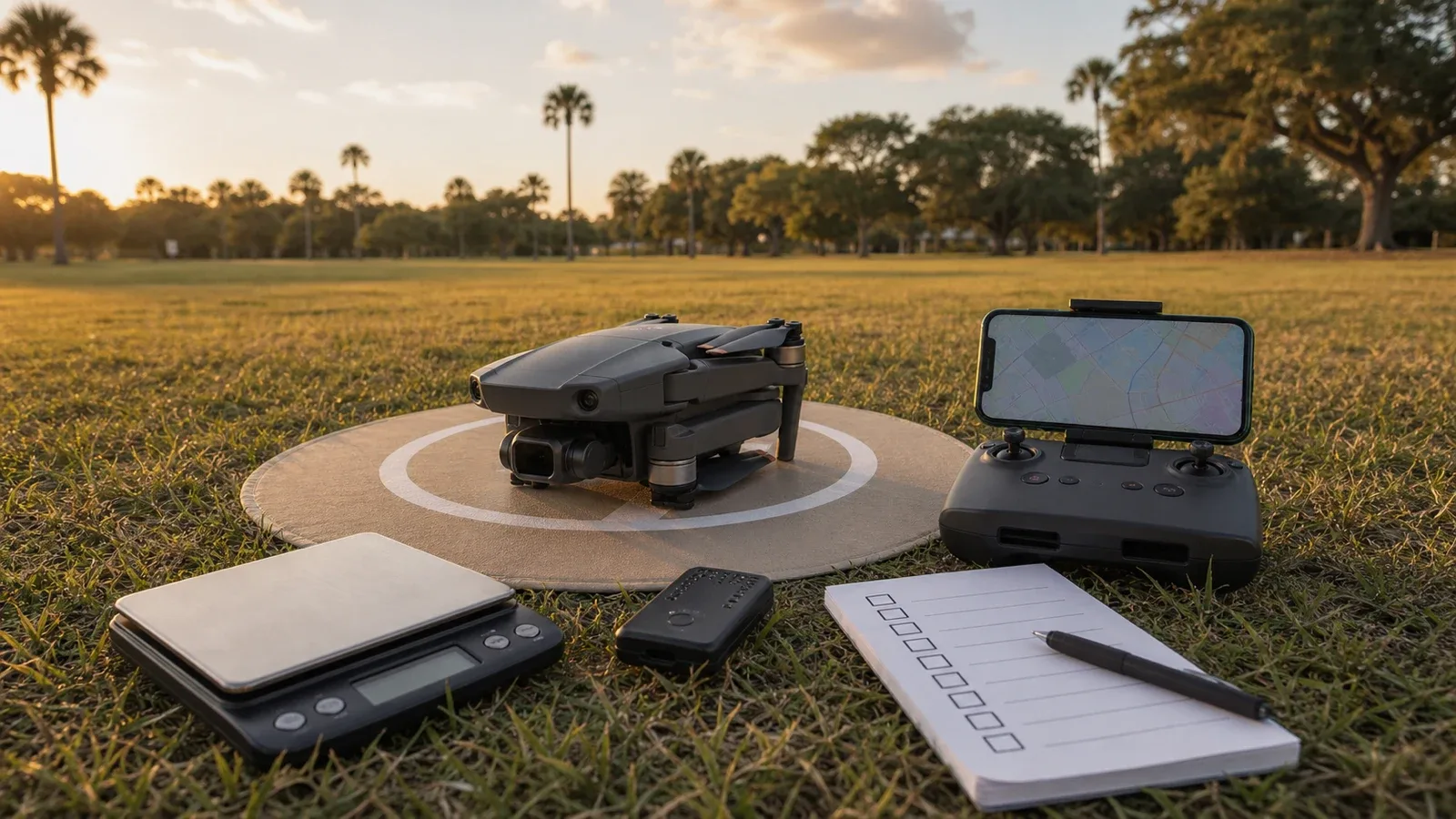
Use an accurate scale and leave some margin instead of treating 249 grams as a magic force field. A different battery, prop guards, a strobe, or a broadcast module can change the takeoff weight.
3. Identify the Compliance Path Before You Buy or Fly
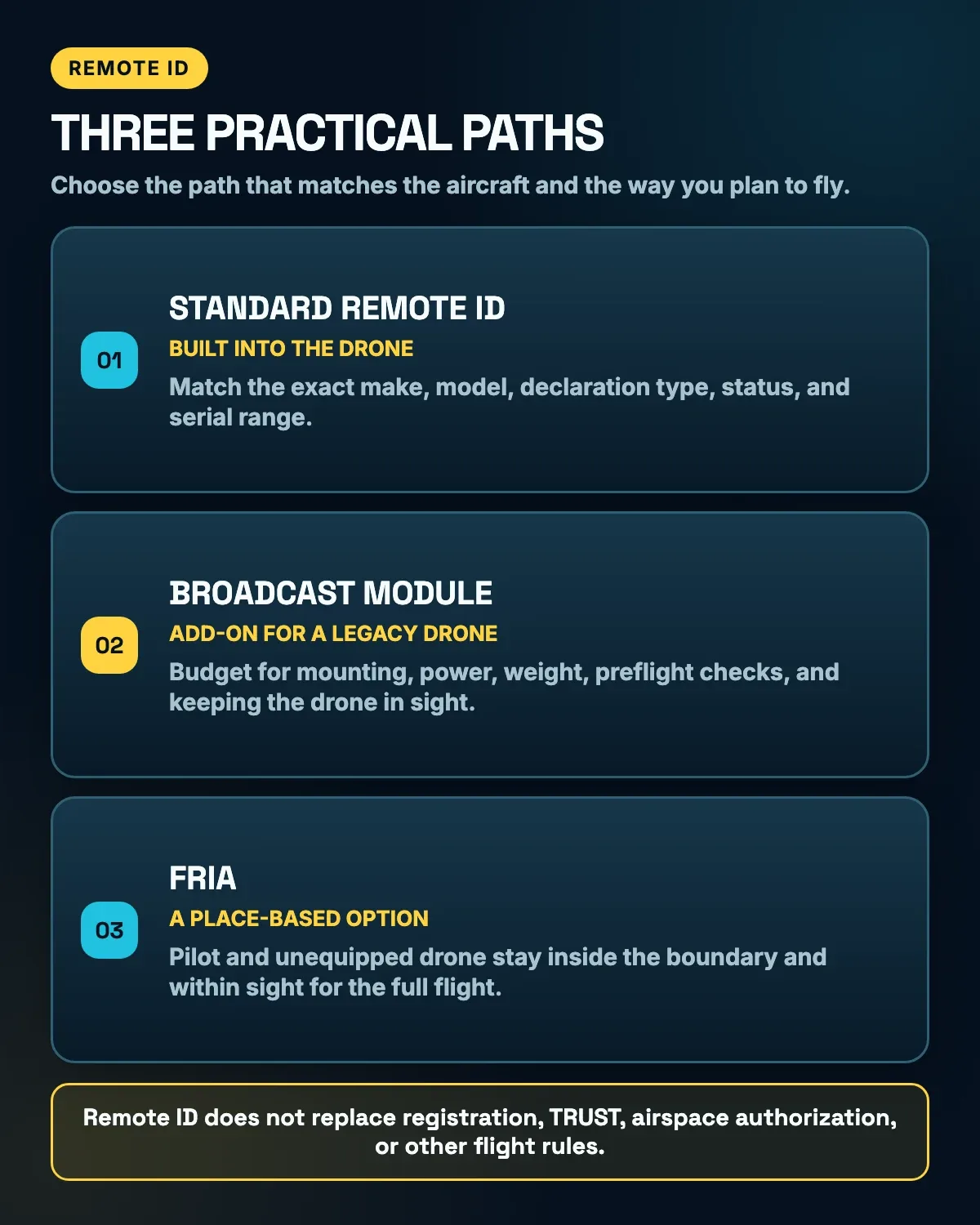
For most pilots and shoppers, there are three practical Remote ID paths.
Standard Remote ID
The drone has Remote ID built in. It broadcasts identification and location information about the drone and the control station.
This is usually the cleanest choice for a new buyer: no separate box to mount, charge, or remember. For the ordinary hobbyist models covered by this guide, the exact aircraft should appear under an FAA-accepted Declaration of Compliance.
Remote ID Broadcast Module
An accepted module is attached to an older or otherwise unequipped drone. The module broadcasts information about the aircraft and its takeoff location.
This can keep a good legacy drone flying, but the rule is stricter than “attach the box and go.” The person manipulating the controls must personally be able to see the module-equipped drone throughout the flight. The pilot must also verify that the module is working before takeoff and land as soon as practicable if the broadcast fails.
FRIA Operation
An unequipped drone may be flown inside an FAA-Recognized Identification Area.
This is a place-based option, not a portable exemption. Both the pilot and the drone must stay inside the FRIA boundaries, and the pilot must keep the aircraft in sight.
Knowing which path your aircraft uses is more important than seeing “Remote ID ready” in a product description. “Ready” can mean built in, available after an update, compatible with a separate module, or simply written by a seller who was feeling optimistic.
4. Look Up the Exact Drone in the FAA Database
This is the check I would do before trusting a product page, marketplace description, or seller’s memory.
Open the FAA’s accepted Remote ID Declaration of Compliance list. A Declaration of Compliance, usually shortened to DoC, is submitted by the manufacturer. It covers a specific aircraft or broadcast module produced to meet the applicable Remote ID requirements.
The page also contains declarations for Operations Over People. Remote ID and Operations Over People require separate accepted declarations, so seeing the model somewhere in the system is not enough.
The buyer does not submit this declaration. If the aircraft or module is missing from the accepted list, an owner cannot repair that problem by filing a personal form.
A Simple Declaration of Compliance Example
Suppose a marketplace listing says “DJI Mini 3 Pro.” Here is the practical check:
- Set the declaration type to RID.
- Confirm the status is Accepted.
- Match the exact make.
- Match the exact model.
- Match Declaration For: Unmanned Aircraft for built-in Standard Remote ID or Broadcast Module for an add-on.
- Confirm the aircraft’s actual Remote ID serial falls inside the declared range.
When checked on July 10, 2026, the FAA’s Mini 3 Pro record showed accepted tracking record RID000000001-3, a detail record created January 10, 2026, and an accepted-list update dated February 4, 2026. Its declared serial range begins 1581F4XF000000000000 and ends 1581F4XFFFFFFFFFFFFF.
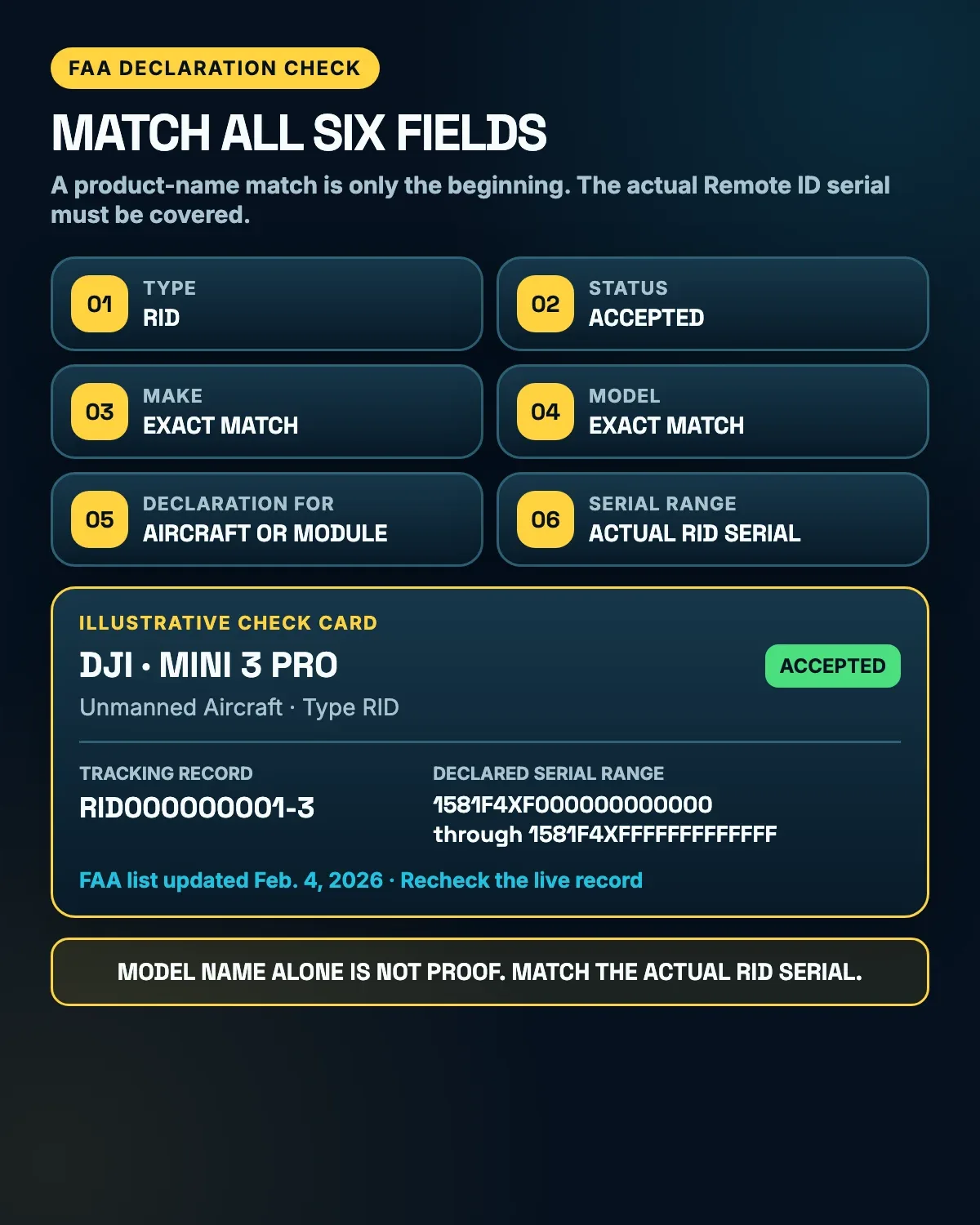
That current amendment is a perfect example of why an old screenshot is not enough. More importantly, the model name alone does not prove that a particular used aircraft is covered. Match the actual Remote ID serial.
Exact words matter. “Mini 3,” “Mini 3 Pro,” and a product-family nickname are not interchangeable just because the boxes look related and the names were apparently created during a meeting where somebody ran out of nouns.
The list is live, and declarations can be amended or rescinded. Check it close to the purchase date and again before registration or the first flight.
5. Find the Actual Remote ID Serial Number and Test the Aircraft
Finding the model in the FAA database is only half the job. The next step is matching the real aircraft to the record.
According to the FAA, the Remote ID serial number may appear on the drone, the controller, or one of the controller’s startup screens. The manufacturer may provide additional instructions for locating it.
Do not assume the serial number printed on the retail box is automatically the Remote ID serial number needed for registration.
For a new drone, confirm where the manufacturer displays that number. For a used drone, ask the seller to power it on and show the Remote ID information. If the seller cannot locate it, that does not automatically prove the aircraft is noncompliant, but it is a good reason to pause the purchase.
A useful powered-on demonstration looks like this:
- Assemble the aircraft in the configuration it will normally fly.
- Power on the aircraft, controller, and required app or display.
- Open the manufacturer’s official screen or menu that shows the Remote ID serial.
- Confirm there is no persistent Remote ID error or unsupported-firmware warning.
- Compare the displayed Remote ID serial with the accepted declaration’s range and save the number needed for DroneZone.
If a model gained Remote ID through a manufacturer update, verify that the required firmware and app/controller versions are installed and that the drone actually exposes a valid Remote ID serial number. “It should work after an update” is a plan, not proof.
A Standard Remote ID drone must broadcast from takeoff through shutdown, and its Remote ID functionality must not be disabled during operation. If the system stops broadcasting during flight, the pilot must land as soon as practicable.
A powered-on demonstration cannot prove every technical detail, but it is much better than buying a mystery aircraft and hoping a compliant serial number appears later through positive thinking.
6. Price the Full Broadcast-Module or FRIA Solution
An older drone without Standard Remote ID is not automatically useless. An accepted Remote ID broadcast module may keep it in service.
The module solution comes with real costs and limits:
- The module’s purchase price
- A secure mounting method
- A battery or power connection
- Added takeoff weight
- Possible effects on flight time or balance
- Another device to charge and test
- A visual-line-of-sight operating requirement
For recreational registration, the FAA allows one accepted broadcast module to move among multiple older drones when each drone’s make and model is properly listed in the same recreational inventory using that module’s Remote ID serial number.
Part 107 works differently. Each aircraft is registered separately. When an aircraft relies on a broadcast module, its registration entry uses the aircraft make and model plus the module’s serial number, and that module serial cannot appear on more than one registration certificate at the same time.
This is where a cheap used drone can stop being cheap. Add the module, mounting hardware, power, registration work, and operating limits before comparing its real cost with a newer Standard Remote ID model.
A FRIA can be a sensible alternative for someone who flies an older model at one established club field. But confirm that the FRIA is a realistic plan, not a word a seller used to end the conversation.
The FAA publishes current locations through its FRIA page and official map. Check that:
- The FRIA still appears on the current FAA map.
- The location is close enough to use regularly.
- The site permits access.
- Any club, school, or property rules are understood.
- If the surrounding airspace requires separate authorization, it can be obtained before the flight.
FRIA approvals can expire, change, or be terminated. A forum post from three years ago is not a dependable flight plan.
Also, Standard Remote ID drones and module-equipped drones must continue broadcasting inside a FRIA. A FRIA does not give the pilot permission to turn compliant equipment off.
For someone who wants to travel, explore, and launch from many legal locations, depending entirely on a FRIA may feel like buying a car that can only leave one parking lot.
7. Understand the Paperwork and Places to Fly
The FAA currently charges $5 for a recreational registration that covers the owner’s recreational drone inventory and remains valid for three years. Part 107 registration is $5 per aircraft and also lasts three years.
Registration records for Remote ID aircraft must include the applicable Standard Remote ID aircraft serial number or broadcast-module serial number.
After registration, the pilot must place the FAA registration number legibly on an external surface, keep the marking affixed throughout the operation, and carry the registration certificate in paper or digital form while flying.
Used drones add another detail. The FAA says the seller should cancel the sold aircraft’s registration or remove its listing, as appropriate; that does not mean a recreational owner must cancel every other aircraft in the inventory. The buyer should add or register the aircraft in the buyer’s own DroneZone account, remove the seller’s old registration marking, and apply the buyer’s marking before flying. The old number is not a bonus accessory.
The FAA also does not let one registration move freely between recreational and Part 107 categories. If the intended operation changes, use the correct registration process instead of assuming the old entry covers everything.
Returning hobbyists should check whether an old registration expired. The FAA says that if a previously listed drone was recorded without Remote ID and now needs a Remote ID entry, the pilot may need to create a new listing for that same aircraft with the correct serial information.
A Practical Airspace Check
Start with an FAA-approved B4UFLY service to check the location. B4UFLY is now provided through several approved desktop and mobile apps rather than one standalone FAA app.
The map provides situational awareness; it is not automatically an authorization. If the location is in controlled airspace, obtain approval through LAANC where available or through DroneZone where LAANC is not available.
A practical sequence is:
- Check the exact launch location in a B4UFLY provider.
- Determine whether the airspace is controlled and whether authorization is required.
- Request LAANC or DroneZone authorization when needed and wait for approval.
- Recheck temporary flight restrictions, NOTAMs, weather, and the planned time.
- Confirm the park, property owner, or local authority allows takeoff and landing.
Airspace authorization does not grant permission to use somebody’s property, and property access does not grant airspace authorization. Sometimes the answer is “yes” in one layer and “not yet” in another.
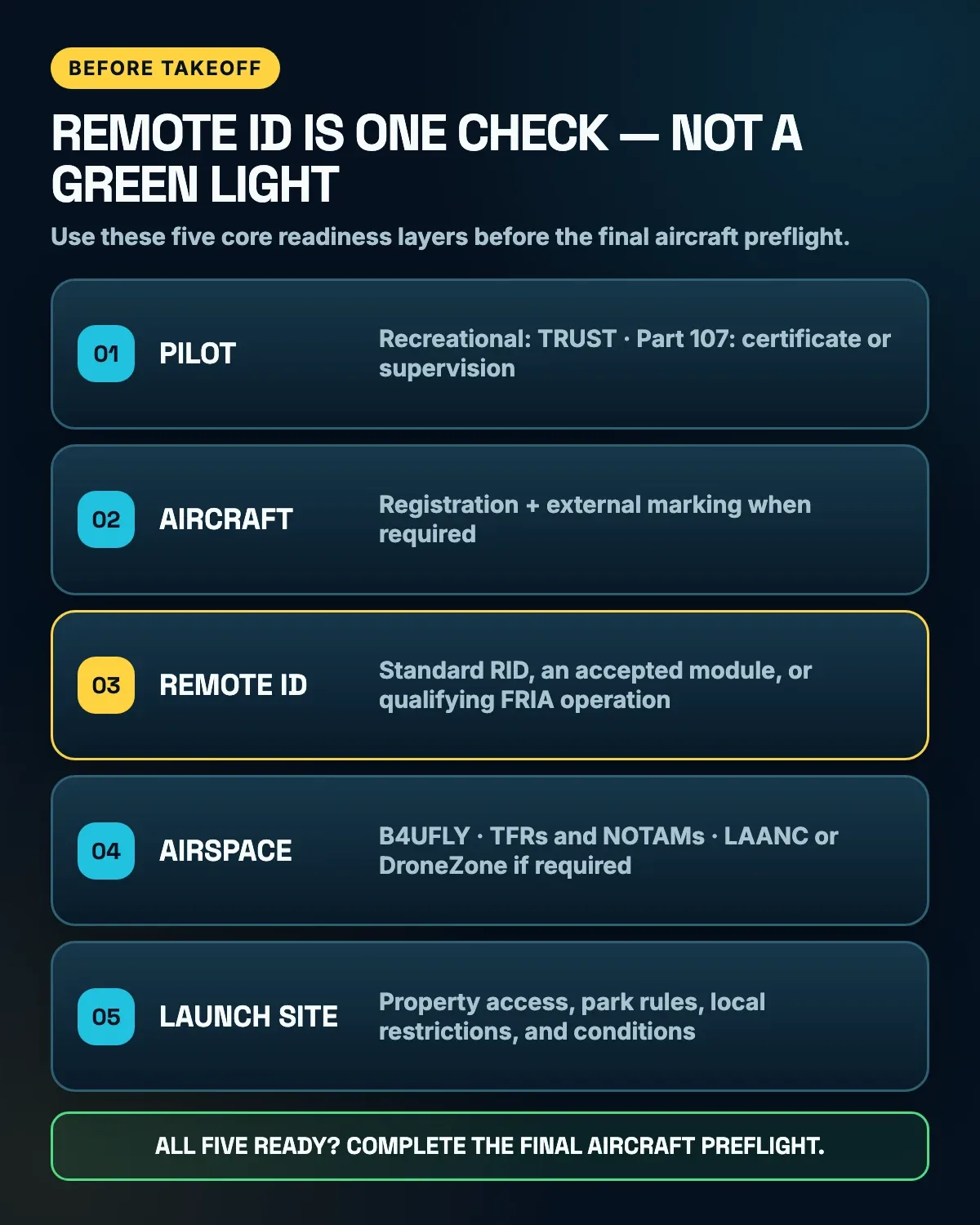
Remote ID answers an identification question. Before takeoff, the pilot qualification, registration and marking, Remote ID path, airspace, and launch-site permission all need to line up.
A Note for Parents Buying a Drone
A drone marketed as a toy can still be an aircraft when it is operated outdoors in the National Airspace System.
Recreational flyers must take the free TRUST test and carry proof of passing while flying. The FAA does not set a minimum age for TRUST, so the person actually flying should complete it and keep the certificate. The test is not designed to turn a child or parent into an aviation attorney. It covers the basics needed to avoid preventable problems.
If the owner is younger than 13 and registration is required, someone who is at least 13 must register the drone.
Parents should also think about the account, phone, app, controller, charging routine, safe flying location, and who will supervise the first flights. The drone may be ready to fly long before the household is ready for it.
A Note for Returning Hobbyists
An older drone is not automatically grandfathered out of Remote ID operating requirements.
If the aircraft is registered or must be registered, give it a current Remote ID operating path instead of assuming it is grandfathered. Home-built aircraft may have different production rules, but that does not erase operating requirements when registration applies.
Before reviving an old model, check the battery condition, current firmware support, registration status, Remote ID path, and legal places to fly. The aircraft may still have plenty of life left. It just deserves a current checklist instead of rules remembered from its last flight several years ago.
The 60-Second Before-You-Fly Checklist
Before paying or taking off, make sure you can answer all seven questions:
- Is the planned use purely recreational, Part 107, or potentially both?
- What does the complete aircraft weigh at takeoff?
- Is the path Standard Remote ID, a broadcast module, or FRIA-only operation?
- Do the RID type, Accepted status, exact make, exact model, declaration category, and serial range match the live FAA list?
- Can the seller or manufacturer show the actual Remote ID serial number and working setup?
- What is the true cost after a module, mount, power, extra weight, and operating limits?
- Are the pilot qualification, registration and marking, airspace approval, and launch site ready?
If one answer is “I think so,” keep checking. Ten minutes now is cheaper than discovering the problem after the return window closes or at the first launch.
Final Thought
Remote ID is not the most exciting part of owning a drone, but it is easier to verify the details now than to untangle them after the purchase or at the launch site.
The goal is not to scare anyone away from drones. It is to make sure the drone fits the way you actually want to fly.
Check the purpose, weight, exact model, serial number, compliance path, location, and registration plan. Then get back to the enjoyable part: learning to fly without introducing the drone—new or revived—to the nearest tree.
Official Sources
- FAA: Remote Identification of Drones — last updated March 19, 2025; accessed July 10, 2026.
- FAA: Accepted Remote ID Declarations of Compliance — live list accessed July 10, 2026.
- FAA: Mini 3 Pro Remote ID Declaration — live record accessed July 10, 2026.
- FAA: How to Register Your Drone — last updated March 18, 2024; accessed July 10, 2026.
- FAA: Recreational Flyers — last updated March 18, 2026; accessed July 10, 2026.
- FAA: The Recreational UAS Safety Test — last updated June 1, 2026; accessed July 10, 2026.
- FAA: Educational Users — last updated March 13, 2026; accessed July 10, 2026.
- FAA: Aeronautical Information Manual, section 11-5-1 — current guidance accessed July 10, 2026.
- FAA: Part 107 Overview — dated July 6, 2026; accessed July 10, 2026.
- FAA: FAA-Recognized Identification Areas — last updated August 7, 2024; accessed July 10, 2026.
- FAA: B4UFLY — last updated July 31, 2025; accessed July 10, 2026.
- FAA: LAANC — last updated December 5, 2024; accessed July 10, 2026.
- eCFR: 14 CFR Part 89 — current electronic regulation accessed July 10, 2026.
- eCFR: 14 CFR Part 48 — current electronic regulation accessed July 10, 2026.
- eCFR: 14 CFR 48.205, Display and Location of Registration Number — current electronic regulation accessed July 10, 2026.
- FAA: Sold or Transferred Drone Registration FAQ — accessed July 10, 2026.
This article is a plain-English overview for general information, not legal advice. FAA rules, declarations, maps, and registration procedures can change. Verify the current official sources for your aircraft and planned operation before flying.