Trust & transparency
Evidence & disclosures
Evidence basis: Researched analysis. The article compares public evidence and does not claim hands-on testing unless a section says otherwise.
Built from Google’s people-first and SEO guidance; the checklist covers fundamentals, not a promise of indexing, traffic, or rankings.
Sources checked: Aug 20, 2026
Linked references: 2 explicit sources in the article.
10 Simple SEO Fixes Beginners Should Make Before Publishing a Website
Publishing a first website feels bigger than it probably should.
You pick a design. You move things around. You change the headline seventeen times. You wonder if the button should say "Contact Me" or "Let's Talk" or something more emotionally available. Then, right before you hit publish, the little SEO voice shows up.
Is Google going to find this?
Do I need keywords?
Should I buy a course?
Did I accidentally build a beautiful website that search engines will treat like a locked filing cabinet?
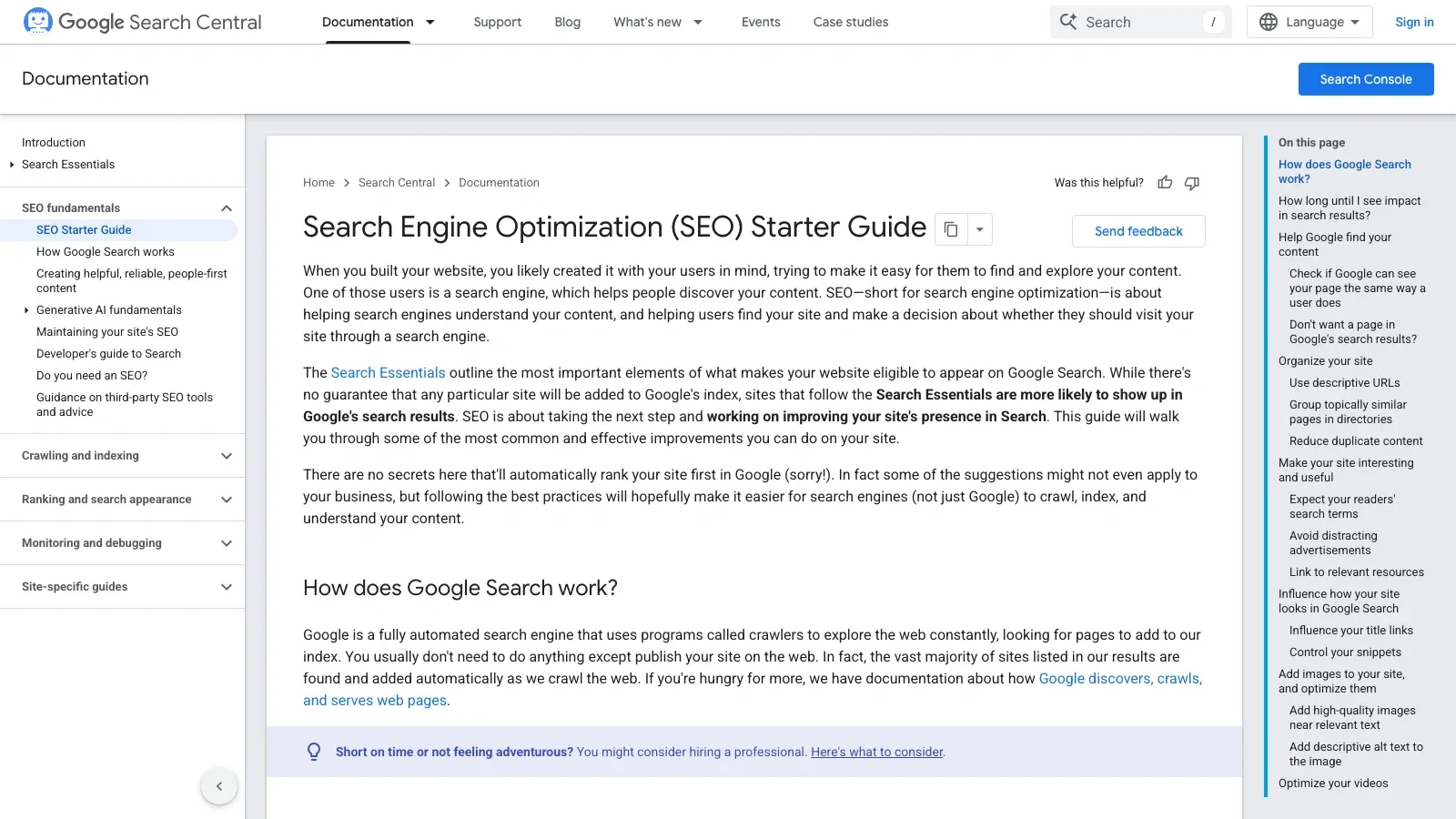
The good news is that Google's own SEO Starter Guide is much calmer than the internet makes SEO sound. It is not a secret ranking spell. It is more like a basic launch inspection: can search engines find the site, understand the pages, and give real people enough information to decide whether they want to click?
That is a much healthier way to think about it.
So this is the beginner version I would use before publishing a personal site, small business site, blog, portfolio, or first project page. Not advanced SEO. Not an agency audit. Just ten simple checks that keep you from missing the obvious stuff.
TLDR
- Give every important page a clear, unique title.
- Write one plain sentence that says what each page is for.
- Use normal words your reader would actually search for.
- Make sure Google can access the page and its basic resources.
- Use readable URLs instead of random strings.
- Link your important pages together.
- Add helpful images near relevant text, with descriptive alt text.
- Create or confirm a sitemap if your site builder supports one.
- Set up Google Search Console after launch so you can inspect pages.
- Do not waste your first week chasing SEO myths like meta keywords, magic word counts, or keyword-stuffed domain names.
Why I Like Google's Starter Guide For Beginners
SEO advice online can get weird fast.
One minute you are trying to publish a simple homepage, and the next minute someone is yelling about entity clusters, topical authority, domain power, 47-point schema stacks, and why your blog will die unless every paragraph has been optimized by a spreadsheet with trust issues.
Google's starter guide is refreshingly boring in the best possible way.
It starts with the obvious but important point: SEO is about helping search engines understand your content and helping users decide whether they should visit your site from search. That is the beginner compass.
Not trick Google.
Not win the internet by Friday.
Help the page make sense.
Google also says there is no secret that automatically ranks a site first. I appreciate that little bucket of cold water. SEO does matter, but it is not a vending machine where you insert three keywords and receive traffic.
For a beginner launch, the job is much simpler: make a site that people can use, make pages that are clear, and avoid accidentally hiding the good stuff from search engines.
1. Give Every Important Page A Clear Title
Your page title is one of the first things people see in search results, browser tabs, bookmarks, and shared links.
This does not need to be fancy. In fact, fancy is often where beginners get into trouble.
A good title should answer a basic question: what is this page?
Bad beginner title:
- Home
- Welcome
- Services
- Untitled Page
- The Best Solutions For Your Digital Transformation Journey
Better beginner title:
- Colin Michaels - Applications Developer
- Custom Deck Builder In Jupiter, Florida
- Beginner Drone Photography Tips
- About Riverbend Family Dentistry
- 10 Simple SEO Fixes Beginners Should Make Before Publishing A Website
Google's guide explains that title links can be influenced by the page's title text and headings. It also says good titles should be unique, clear, concise, and accurate.
That is the whole assignment.
Before launch, open each important page and ask:
- Does the title describe this exact page?
- Is it different from the other page titles?
- Would a stranger understand it?
- Did I put the important words near the beginning?
You do not need to sound like an SEO robot. You just need to avoid making Google and humans guess.
2. Write One Plain Sentence For Each Page
This is my favorite beginner test.
For every important page, write one sentence that explains what the page is for.
Not a slogan. Not a mission statement. Not "empowering innovative solutions through excellence." Nobody wakes up excited to read that.
Use a sentence like:
- This page explains how to book a family photography session in Jupiter, Florida.
- This article shows beginners how to publish their first website with Firebase Hosting.
- This services page explains what I build, who I help, and how to contact me.
- This restaurant page shows the menu, hours, address, and reservation link.
That sentence can become the first paragraph, the meta description, the internal planning note, or simply the reality check that keeps the page honest.
Google's guide explains that snippets in search results are often taken from the page content, though the meta description can sometimes be used. Either way, the page needs a clear explanation of itself.
If you cannot explain the page in one sentence, the page may be trying to do too many jobs.
That is not an SEO problem yet. That is a clarity problem.
Fix the clarity first.
3. Use The Words Your Reader Would Use
Beginners hear "keywords" and often think they need to sprinkle magic phrases around the page like seasoning.
That usually makes the writing worse.
A better question is: what would a normal person type if they needed this?
Google's guide gives a simple example: someone experienced might search for a fancy term, while a beginner may use a more common phrase. The point is not to jam every variation into the page. The point is to write with your reader in mind.
For example, if you are writing a page about building websites, your reader might search:
- how to make a personal website
- first website checklist
- small business website launch
- what should be on my homepage
- how to get my website on Google
You can naturally include those ideas without turning your page into keyword soup.
The rule I like is this:
Say the thing the way your reader would say it, then explain it the way you would explain it to a friend.
That will usually beat a page that sounds like it was assembled from search terms in a blender.
4. Make Sure Google Can Actually See The Page
This is the part nobody thinks about until something breaks.
Google has to be able to access your page. It also needs access to the resources that help it understand the page, like CSS and JavaScript. Google's starter guide says Google should ideally see the page the same way an average user does.
For a beginner, this means checking the boring stuff:
- The page loads without a password.
- The page is not blocked by robots.txt.
- The page does not have a noindex tag if you want it in search.
- The page works on a phone.
- The important text is real page content, not only trapped inside an image.
- The navigation and main content are visible when the page loads.
If you are using a website builder, you may have a setting like "hide from search engines" or "discourage indexing." That can be useful while building, but it is a classic launch-day mistake to forget it is turned on.
Before publishing, look for that setting.
It is not glamorous, but neither is locking the front door and wondering why nobody came to the party.
5. Use Readable URLs
A URL does not need to be poetry.
It just needs to be understandable.
Google's guide points out that words in a URL can help users understand whether a result will be useful. A readable URL is also easier to share, remember, and recognize.
Beginner-friendly URLs look like:
- /about
- /services
- /blog/first-website-launch-checklist
- /contact
- /projects/local-ai-server
Less helpful URLs look like:
- /page?id=847392
- /2/6772756D707920636174
- /new-page-copy-final-v3-real-final
Will a messy URL destroy your website? No.
Should you fix obvious messes before launch? Yes.
Use lowercase words. Separate words with hyphens. Keep the page address close to the page topic. You do not need to cram keywords into every folder. You just want the URL to make sense to a person who sees it in a search result, text message, or browser bar.
6. Link Your Important Pages Together
Links are how people move through your site. Links are also one of the ways search engines discover pages.
This is where a lot of beginner sites accidentally become a drawer full of loose papers.
The homepage exists. The services page exists. The blog exists. The contact page exists. But nothing clearly connects them, so a visitor has to work too hard.
Before launch, click through your own site like a stranger.
Can someone get from the homepage to your most important page?
Can someone get from an article to a related article?
Can someone reach the contact page without going on a scavenger hunt?
Can a blog post link to the guide, project, product, or resource it mentions?
Google's guide emphasizes that link text tells users and Google something about the page being linked to. That means the words in the link matter.
Use helpful link text:
- Read the beginner Firebase Hosting guide
- Contact me about a website project
- See the Search Console launch checklist
Try to avoid vague link text when the link matters:
- Click here
- Read more
- This
Sometimes "read more" is fine in a card layout. But inside an article or page body, give the link a little meaning.
7. Add Useful Images Near Relevant Text
Images can help people understand a page faster.
They can also help people find your site visually, especially for posts about food, products, places, projects, repairs, tutorials, art, photography, or anything where the thing itself matters.
Google's guide recommends using sharp, clear images and placing them near relevant text. That last part is important. Do not throw a random pretty image at the top of the page and call it done.
For a beginner website, this might mean:
- A real photo of the business owner on the About page.
- A project screenshot next to the project description.
- A before-and-after image near the explanation of the work.
- A map or exterior photo near location information.
- A blog image that actually represents the article.
You do not need twenty images. You need the right images in the right places.
For this post, a useful image is not just "SEO vibes." A useful image would show the official guide, the checklist, or the common launch checks a beginner should understand.
8. Write Descriptive Alt Text
Alt text is not a place to stuff keywords.
Alt text should explain the image in context.
Google's guide describes alt text as a short descriptive piece of text that explains the relationship between the image and the content. That is a helpful definition because it reminds us the image and page are connected.
Weak alt text:
- image
- SEO
- website
- best website launch SEO checklist Google keywords ranking
Better alt text:
- Screenshot of Google's SEO Starter Guide page.
- Checklist on a laptop before publishing a website.
- Search result example showing a page title and description.
- Photo of a custom wood deck attached to a beach house.
If the image is decorative, your CMS or HTML may let you mark it as decorative so screen readers skip it. If the image explains something, describe what matters.
A simple rule:
If the image disappeared, what would someone need to know?
Write that.
9. Create Or Confirm A Sitemap
A sitemap is a file that lists the URLs on your site that you care about.
For many beginner sites, the sitemap lives at:
https://yourdomain.com/sitemap.xml
Google's guide says many content management systems create sitemaps automatically. That includes a lot of website builders, blog platforms, ecommerce platforms, and modern frameworks.
So before you build one by hand, check whether your tool already made it.
For a small site, a sitemap is not magic. It does not guarantee indexing. It does not make Google rank you. It simply helps Google discover pages, especially when your site is new and does not have many external links yet.
Before launch, check:
- Does my site have a sitemap?
- Does the sitemap URL load in a browser?
- Does it include the important public pages?
- Does it leave out drafts, private pages, test pages, and junk?
After launch, submit the sitemap in Google Search Console. That part belongs in the companion post about what to check after your first website is live.
10. Set Up Search Console After Launch
This checklist is mostly about what to fix before publishing.
But the first thing I would do after launch is set up Google Search Console.
Search Console helps you see whether Google can find and inspect your pages. Google's starter guide points readers there as a next step, and the tool becomes your calm dashboard after the site is public.
For a new site, Search Console can help answer:
- Has Google found my homepage?
- Did my sitemap submit correctly?
- Is the page indexable?
- Are there crawl or indexing errors?
- What search queries are starting to show impressions?
Do not expect instant drama. Google's guide says changes can take anywhere from hours to months to show effects, and it recommends waiting a few weeks before judging whether SEO changes helped.
That is annoying because patience is not a great user interface.
But it is better than refreshing reports every ten minutes and trying to interpret silence as a personal insult.
What Not To Worry About Yet
One of the most useful parts of Google's starter guide is the section on things not to focus on.
That matters because beginners are often handed a shopping cart full of fake urgency.
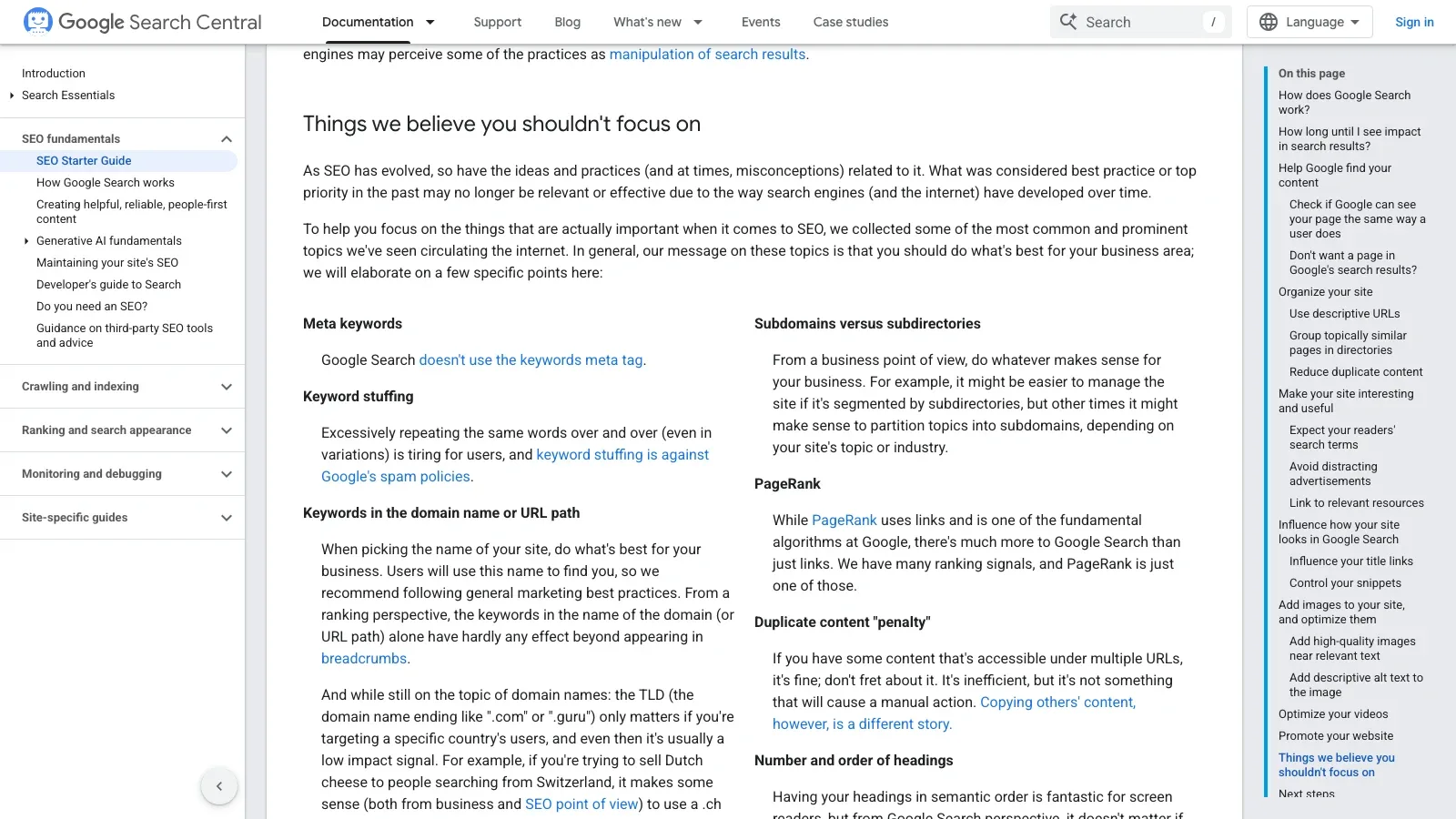
For a first launch, I would not spend much time worrying about:
- Meta keywords. Google says it does not use the keywords meta tag.
- Keyword stuffing. Repeating the same words until the page sounds broken is bad for readers and against Google's spam policies.
- Magic word counts. Google's guide says content length alone is not a ranking factor.
- Buying keyword-heavy domains. A clear, memorable brand is usually better than a weird domain name stuffed with search terms.
- Heading perfection for ranking. Use headings to organize the page for humans and accessibility. Do not treat headings like secret levers.
- E-E-A-T as a direct ranking factor. Quality and trust matter, but beginners should not turn the acronym into a panic button.
This is good news.
It means your first launch checklist can be practical. You can spend your limited energy making the site clear, helpful, organized, and readable instead of cosplaying as an SEO conspiracy investigator.
The Simple Pre-Publish Checklist
Use this before you hit publish.
Page clarity:
- Every important page has a clear title.
- Every important page has one plain sentence explaining its purpose.
- The homepage says who the site is for and what someone can do next.
- The writing uses normal reader language, not keyword stuffing.
Findability:
- Important pages are linked from navigation, the homepage, or related pages.
- URLs are readable.
- The site is not hidden from search engines.
- Important pages do not accidentally use noindex.
- The sitemap exists if your platform supports one.
Usefulness:
- The content is original and actually useful to the reader.
- Headings break up the page.
- Images are sharp, relevant, and near related text.
- Images have descriptive alt text when needed.
- Contact, booking, buying, subscribing, or next-step buttons are obvious.
After launch:
- Set up Google Search Console.
- Submit the sitemap.
- Inspect one important page.
- Give Google time.
- Keep improving the site for real people.
A Tiny Example
Imagine a beginner launches a one-page site for a small landscaping business.
The first draft has:
- Title: Home
- URL: /page1
- Heading: Welcome
- Main text: We provide quality services for all your needs.
- Image alt text: grass
- No sitemap checked.
- No Search Console set up.
That site might look fine, but it is asking visitors and search engines to do too much guessing.
A better version:
- Title: Jupiter Lawn Care And Landscaping - Palm Yard Co.
- URL: /jupiter-lawn-care
- Heading: Lawn Care And Landscaping In Jupiter, Florida
- Main text: Palm Yard Co. helps Jupiter homeowners with mowing, trimming, cleanup, and simple landscape maintenance.
- Image alt text: Freshly trimmed front yard in Jupiter, Florida.
- Navigation links to Services, Photos, Reviews, and Contact.
- Sitemap confirmed.
- Search Console set up after launch.
That is not advanced SEO.
That is basic clarity.
And basic clarity is exactly where beginners should start.
Final Thought
SEO gets intimidating when it feels like a hidden game controlled by people with dashboards, acronyms, and very intense opinions about commas.
But the beginner launch version is much more human.
Make the page clear. Make the site usable. Use titles that describe the page. Use links that help people move around. Use images that support the content. Do not hide the site from search engines. Set up Search Console after launch and watch for real issues.
That is enough for the first pass.
You can always improve later. In fact, you probably should. Websites are living things in the least creepy possible sense.
But before you publish, get the basics right.
The point is not to make Google happy in some mysterious abstract way. The point is to make a site that people can understand, and to make sure search engines are not left standing outside trying to read the sign through a foggy window.
That is a launch checklist I can actually get behind.
Source Notes
- Google Search Central: SEO Starter Guide, official documentation. Source URL: https://developers.google.com/search/docs/fundamentals/seo-starter-guide
- Source supplied as accessed July 8, 2026; refreshed July 9, 2026. The official page showed "Last updated 2025-12-10 UTC."
- Related companion post in this Auto Blog workspace: What to Check in Google Search Console After You Launch Your First Website.